
Meal plan tracking is most useful when dietary histories, prescribed plans, and follow-up changes stay connected in the clinical workflow. Clinical diet software for physicians can organize patient information alongside nutrition care and insurance billing tasks. The goal is a clearer, more consistent process, not another disconnected record to maintain.
It’s reasonable to expect a system to do more than store a meal plan. Clinicians need a practical way to review dietary information and keep care processes moving. This article explains how clinical diet software for physicians can support meal plan tracking, digital diet orders, and practice workflows, including cash-pay and insurance functions.
Key Takeaways
- Use dietary histories and clinical context to build a clearer baseline for nutrition planning.
- Structure meal plans around individual needs while keeping relevant changes and instructions easier to track.
- Identify where digital diet orders and organized records can fit into clinician workflows.
- Map cash-pay and insurance processes separately so billing tools align with how your practice operates.
What Is Nutrition Software?
Nutrition software organizes dietary information to support clinical assessment and planning. Clinical diet software for physicians can connect patient diagnoses and lab results with tailored nutrition plans in the practice workflow.
Dietary Assessment and Nutrition Insights
A baseline assessment brings together reported food intake, nutrition profiles, and relevant clinical context. Review these details for patterns and gaps before shaping a nutrition plan. For example, compare a patient’s reported meals with documented goals, then use the analysis to guide follow-up questions. The usefulness of insights depends on accurate, sufficiently detailed entries.
Patient Profiles and Dietary Restrictions
A patient profile can record allergies, food restrictions, preferences, and dietary history. Keep these details visible when reviewing meal options. For example, a documented ingredient allergy should inform plan selection. Consider how the management software handles profile updates and helps staff access current information during appointments.
Nutrition Analysis for Chronic Care
Nutrition analysis can organize intake information and highlight nutrients, including micronutrients, for review. Clinicians can consider those findings alongside diagnoses and care goals when supporting chronic disease management. Look for clear summaries that prompt useful follow-up, rather than treating automated analysis as a clinical decision. The clinician determines how findings apply to patient care.
Practice Fit and Platform Capabilities
Physicians in the United States can choose from clinician-facing nutrition platforms with different capabilities. Clinical diet software for physicians may support assessment, meal planning, or patient monitoring, while integrations vary. Compare a platform’s documented connections with your practice’s existing systems and workflow. TeleDIETS offers a web-based platform with secure integration with clinical systems.
To assess evidence about outcomes, look for published evaluations that identify the intervention, measured outcomes, and comparison method. A software feature alone does not demonstrate improved outcomes. Compare platforms against practical priorities, such as reviewing dietary history, considering nutrition needs, and reducing repeated data entry.
Nutrition practices may offer programs lasting Six- or 12 weeks, while the Nutrition For Your Business video series offers 10 expert-led episodes.
What About Meal Plan Tracking?
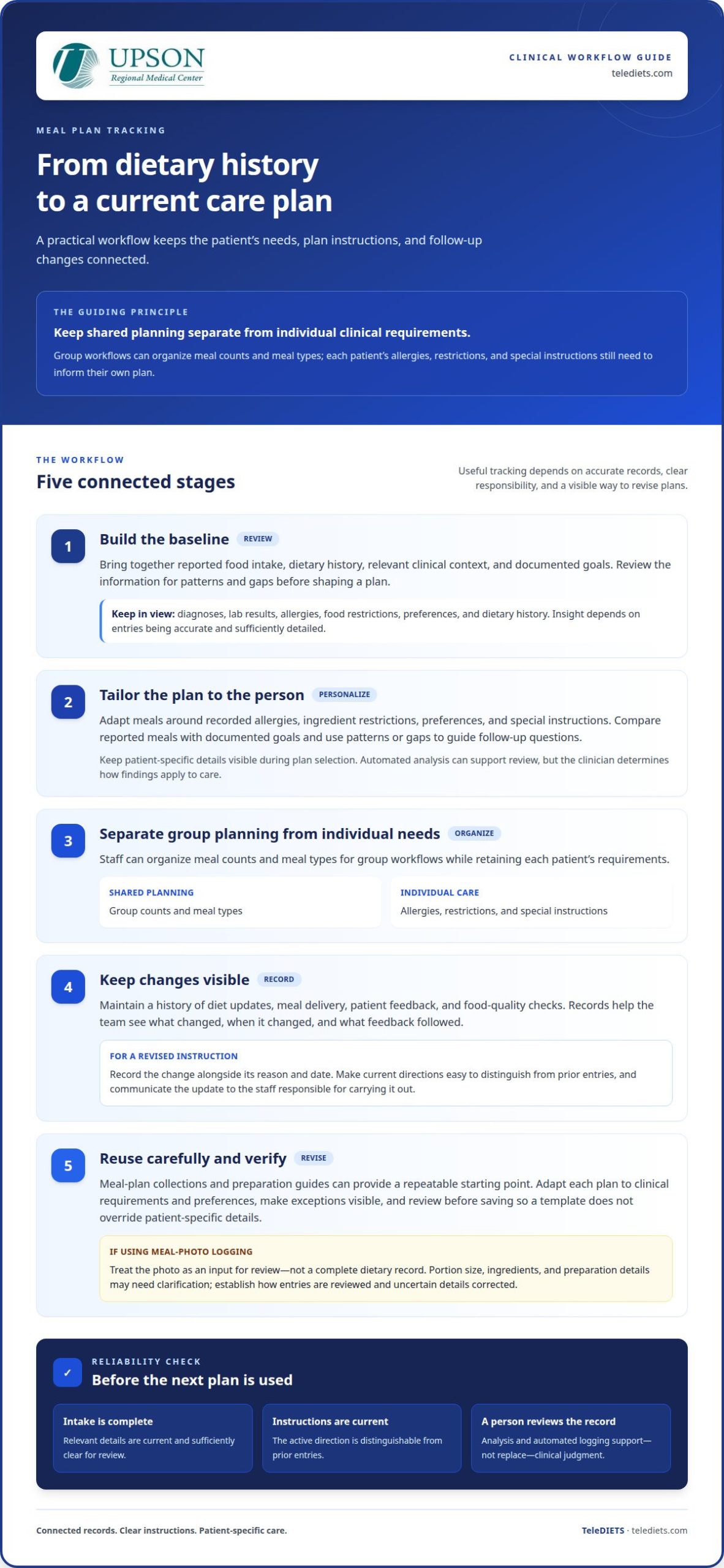
Meal plan tracking connects a prescribed plan with the details clinicians need to review over time. For an individual patient, a dietitian can tailor meals around recorded allergies, ingredient restrictions, and special instructions. For group workflows, staff can organize meal counts and meal types while retaining patient-specific requirements. The key is separating shared planning from individual clinical needs.
A clear workflow can bring patient information and meal plan details together for review. Teams should distinguish shared planning from individual requirements, so that patient-specific details inform each plan. During setup, define which information applies across a group and which must remain specific to an individual’s care.
Tracking also creates a history of changes. A system can maintain records of diet updates, meal delivery, patient feedback, and food quality checks. Reviewing those records helps staff see what changed, when it changed, and what feedback followed. For example, a dietitian can revisit a patient’s meal adjustment alongside recorded feedback before updating the next plan. This is more informative than relying on an undocumented handoff.
Collections of meal plans and client preparation guides can help standardize repeatable workflows. Staff can select a suitable starting plan, then adapt it for an individual’s clinical requirements and preferences. Custom diets should make exceptions visible, especially when a special instruction affects ingredients or meal types. A clear review step helps prevent a reusable template from overriding patient-specific details.
Some platforms may offer AI-powered food logging from meal photos. Treat a photo as an input for review, not a complete dietary record: portion size, ingredients, and preparation details may need clarification from the patient. Before adopting automated logging, establish how dietitians review entries and correct uncertain details. Effective tracking depends on useful records, clear responsibility, and a visible process for revising meal plans.
Clinician workflow and dietary-history efficiency
Digital diet orders let clinicians record dietary instructions within a structured workflow. Common risks include incomplete intake records, outdated instructions, and treating software analysis as a substitute for clinical judgment.
Dietary History and Intake Tracking
Healthcare professionals can use dietary history to understand a patient’s reported intake and identify questions for follow-up. A practical workflow begins with reviewing the history, entering a digital diet order, and recording relevant updates. For example, staff can track a change in dietary instructions alongside its reason and date. Clear roles help clinicians and support staff maintain consistent records across appointments.
Therapeutic Diet Adaptations
Therapeutic diets translate clinical priorities into specific dietary instructions. Clinicians can tailor a plan to reflect a diagnosis, dietary needs, and the patient’s documented intake. A revised instruction should make the change visible to the team responsible for carrying it out. Review each adaptation before saving it, so an outdated order does not remain the active direction.
Scale also matters. Manual dietary management is especially risky in multispecialty hospitals with more than 100 beds. A system should make it practical to enter, review, and communicate diet orders across departments. Healthcare professionals can assess this by mapping how an order moves from the clinician to staff who use it, then identifying where tracking or handoffs may break down.
Efficiency depends on workflow fit, not automation alone. Current instructions should be easy to distinguish from prior entries, with a useful history of changes. Software may not capture the full context behind a patient’s intake, and incorrect or incomplete entries can affect subsequent decisions. Clinicians should review recorded information, resolve discrepancies, and use professional judgment before changing care.
The system lets doctors enter diet orders digitally, supporting a workflow in which clinicians review instructions, record changes, and communicate current directions to the staff responsible for carrying them out.
Cash-pay and insurance workflows
Cash-pay and insurance nutrition services require different administrative paths. A practice should define each workflow before selecting software. For cash-pay, map the service from scheduling through payment recording. For insurance, connect clinical documentation with coding and billing tasks. Keeping these paths distinct helps professionals understand what happens after each appointment.
Map the workflow from service documentation through billing follow-up, and make staff responsibilities clear. For example, a practice can assign roles for entering visit details and reviewing billing records. Software should support the process the practice actually uses, without confusing administrative tasks with clinical decision-making.
Insurance workflows need a clear link between documentation and billing preparation. Clinical notes should accurately describe the nutrition service provided, while coding tools can support the next administrative step. Teams should establish who reviews entries, resolves missing details, and advances claims through their own process. Software can organize this work, but it cannot guarantee coverage, payment, or claim approval.
Assess tools by testing a representative case from start to finish. Follow one cash-pay appointment, then trace an insurance-based service through documentation and coding. Note where staff enter information, whether the workflow preserves a useful record, and which tasks still happen outside the system. This practical review shows whether the platform supports your team’s actual workflow, rather than offering powerful features that go unused.
Choose functionality that supports accurate records and consistent handoffs. For practices managing insurance-related nutrition services, TeleDIETS Insurance Billing & CPT Coding Tools can support billing preparation within the workflow. Consider the services provided, staff responsibilities, and how the practice handles documentation and billing follow-up.
Explore insurance billing and CPT coding tools to see how they can fit into your nutrition workflow.
TeleDIETS: Standard Series Meal Plans
TeleDIETS offers Standard Series Meal Plans for practices incorporating structured nutrition plans into care. Its platform supports physicians in prescribing evidence-based plans tailored to lab results and clinical diagnoses. For practices addressing more complex chronic care needs, Advanced Medical Series Meal Plans provide another plan category to consider. GLP-1 Meal Plan Protocols and Insurance Billing & CPT Coding Tools address additional nutrition and administrative needs.
Consider these offerings when your practice wants to connect medical nutrition planning with its clinical or billing workflow. The right fit depends on the patient populations you serve and the processes your team needs to support. TeleDIETS can be a practical next step for evaluating how meal plan options align with your practice’s needs.
Contact TeleDIETS to discuss its meal plan and billing tools.
Put Your Nutrition Workflow Into Practice
Your next step is to decide what a workable nutrition process should look like in your practice. Identify where clinicians need dietary information, how staff will update plans, and which cash-pay or insurance tasks need clearer coordination. Then use those priorities to assess whether clinical diet software for physicians supports the way your team delivers care.
A focused discussion can help connect those needs with the right tools. Consider which meal plan options suit your clinical approach and whether billing resources belong in the same workflow. TeleDIETS offers Standard Series Meal Plans, Advanced Medical Series Meal Plans, and GLP-1 Meal Plan Protocols. Bring your practice priorities into the conversation and explore how these offerings may fit your work.
Contact TeleDIETS to discuss your practice and take a considered next step toward a more organized nutrition workflow.
Frequently Asked Questions
What is clinical nutrition and diet software for physicians used for?
Clinical nutrition software helps physicians organize medical nutrition therapy within practice workflows. Depending on the platform, it may support dietary protocols informed by clinical diagnoses or lab results, alongside tools for documentation and billing tasks. For example, a physician treating patients with chronic conditions can use structured nutrition resources to make dietary care part of a broader clinical process. It supports, rather than replaces, professional judgment.
How do physician diet software products compare in features and usability?
Compare platforms by matching their features to the work your team needs to complete. Consider how easily staff can review clinical information, find an appropriate meal plan, update records, and complete billing tasks. A practical evaluation uses a representative scenario, such as reviewing patient information, selecting a nutrition plan, and documenting its clinical rationale.
What HIPAA, privacy, and security requirements apply to physician diet software?
HIPAA and other privacy obligations depend on your organization’s role and how patient information moves through its systems. Software alone doesn’t establish compliance. Assess how the platform handles access permissions, stored information, data sharing, and activity records, then document how those processes fit your practice. Your privacy or security lead can evaluate the applicable requirements and vendor arrangements with qualified legal guidance, rather than treating a feature list as proof of compliance.
How can a physician choose and implement clinical diet software in a practice?
Choose software by defining the workflow it must support, then testing that workflow with the staff who will use it. For example, map who enters patient information, reviews nutrition recommendations, and records follow-up actions. Identify required clinical-system connections and billing tasks before implementation. Assign responsibility for staff training and process updates, then review whether the selected functions fit daily practice operations.
What evidence supports clinical diet software for improving patient outcomes?
Look for published evaluations that identify the intervention, measured outcomes, and comparison method. A software feature alone does not demonstrate improved patient outcomes.
Leave a Reply