
Most dietitians manage patients with a connected set of tools, not a single app. A practice may use an EHR for records, scheduling and billing software for operations, and meal-planning tools for nutrition care. A dietitian software API can connect parts of that workflow, while privacy safeguards remain central.
Choosing software involves more than finding a place to store notes. The right setup should support patient management and nutrition planning while working with the systems your practice already uses. Before connecting tools, understand how each one protects health information.
This guide compares common software options by features, integration potential and pricing considerations. It also outlines how to assess privacy safeguards, including Business Associate Agreements, encryption and access logs. Use these practical criteria to choose a setup that fits your workflow, whether you need one core platform or a connected group of tools.
Key Takeaways
- Compare software by the work it supports, from patient records and meal planning to billing, rather than choosing by feature count alone.
- Before handling protected health information, understand how a platform supports encryption, access logs, and a Business Associate Agreement.
- Map the systems in your practice and identify where an API could connect records, scheduling, payments, and nutrition tools.
- Explore how Standard Series Meal Plans may fit when your practice needs structured nutrition plans alongside its existing software stack.
HIPAA compliance and protected health information
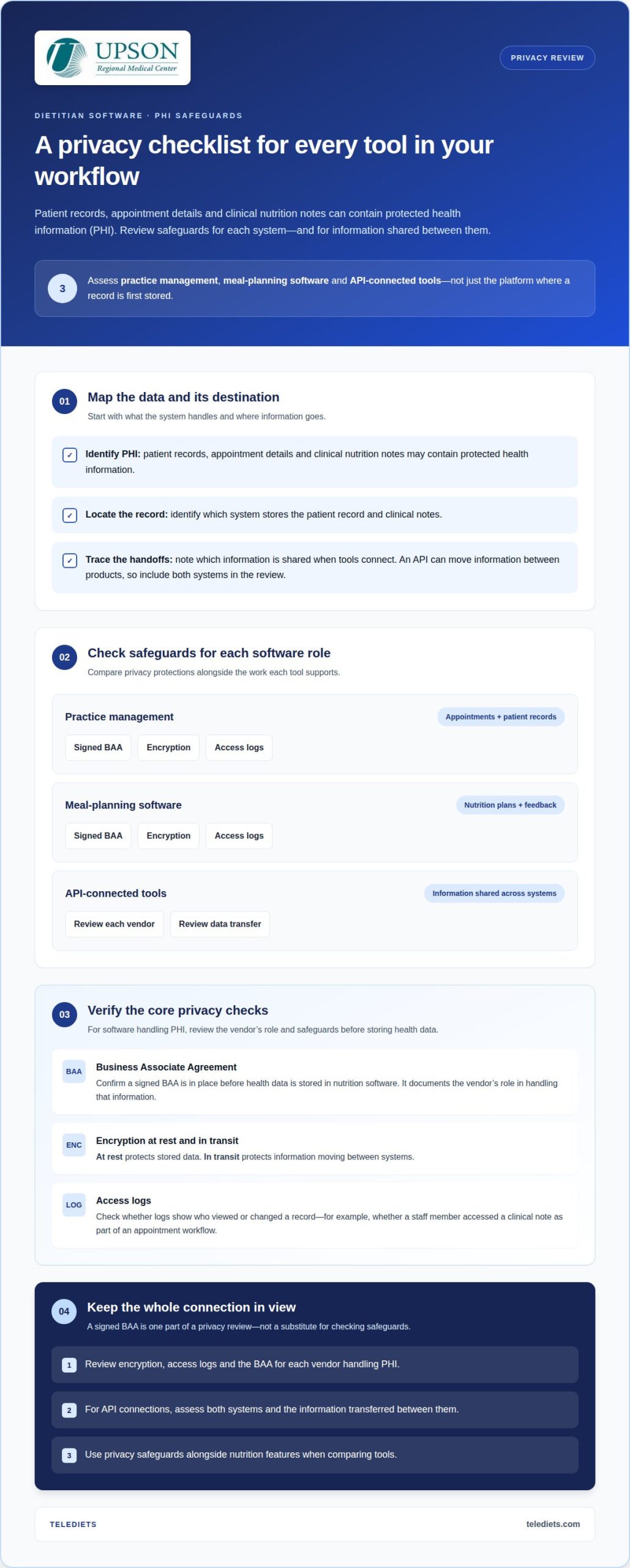
Patient records, appointment details and clinical nutrition notes can contain protected health information (PHI). Before storing client health data in nutrition software, confirm that a Business Associate Agreement (BAA) is in place. It documents the vendor’s role in handling that information.
A signed BAA is one part of a privacy review, not a substitute for checking the software’s safeguards. Dietitian software used in the United States should protect PHI in accordance with the HIPAA Security Rule. Check for encryption at rest, which protects stored data, and encryption in transit, which protects information moving between systems.
Access logs show who viewed or changed a record. For example, a practice can review whether a staff member accessed a clinical note as part of an appointment workflow. Compare privacy safeguards alongside nutrition features; convenient care planning should not obscure how patient data is handled.
| Software option | Typical workflow | Privacy criteria |
|---|---|---|
| Practice management | Appointments and patient records | Signed BAA, encryption, access logs |
| Meal-planning software | Nutrition plans and patient feedback | Signed BAA, encryption, access logs |
| API-connected tools | Information shared across systems | Review each vendor and data transfer |
Use this comparison to assess each tool’s role and data flow. Because an API connection can move information between products, include both systems in your privacy review.
- Identify which system stores the patient record and clinical notes.
- Confirm a signed BAA before health data is stored in nutrition software.
- Review encryption at rest and in transit, plus access logs, for each vendor.
Choose a setup that supports appointments and care planning while addressing safeguards across every connected system. A dietitian software API may link tools, but each vendor’s handling of PHI still needs review.
Software pricing and free options
Nutrition software costs depend on the workflow included, not just the monthly fee. Compare patient tracking, clinical assessment, meal planning, scheduling and billing separately. A low-cost plan may cover basic records but leave automated nutrient calculations or insurance workflows out of scope.
Free options may be a limited software tier, a time-limited trial or a manual spreadsheet, each with different capabilities. A spreadsheet can organize weight trends or supplement notes, but may not connect appointment details with care plans. A trial lets you assess whether the platform’s workflow fits your practice before committing.
Compare each option against a real patient-care task. Map how a new patient moves from intake to assessment, then from a nutrition plan to follow-up tracking. Note which steps happen in the platform and which require another tool. This reveals gaps more clearly than a feature list alone.
- Meal planning: Determine whether plans and nutrient calculations are included or require another platform.
- Practice operations: Compare appointment management, documentation, and payment workflows with your current process.
- Growth: Consider how added staff, patient records, or integrations could affect the plan you select.
For registered dietitians, automation is useful when it removes repetitive work without adding data entry. Test a representative task, such as updating a nutrition assessment and tracking patient feedback. Note whether you have to enter the same information again in another system.
Before selecting a free or paid option, list the capabilities your practice needs now and may need later. Compare plans against the same requirements, including clinical workflows and integrations. This helps distinguish a useful free starting point from a tool that shifts essential work into manual processes.
Combining tools into a dietitian software stack
A connected set of tools can link intake, scheduling, billing and nutrition care without forcing every task into one platform. The goal is a reliable flow of information between the systems your practice uses.
API Documentation and Developer Support
Documentation explains which records and actions an API supports, while sandbox access provides a separate environment for testing connections. Developer support can help troubleshoot implementation questions. These features vary by vendor, so assess each separately rather than assuming an API includes all three. Before building a workflow around a connection, look for clear examples covering patient records, appointments and nutrition plans.
API Access and Integrations
API access determines whether systems can exchange selected information. Potential connections include an EHR, scheduling and payment platforms, messaging, lab portals, accounting tools, and food-tracking apps such as Cronometer or MyFitnessPal. Available integrations differ across platforms. Map a workflow, such as intake flowing into a patient record and appointment scheduling, to identify which handoffs need an API and which remain manual.
For EHR and practice management data, an integration may transfer patient details or notes between systems. Define which record is authoritative, which fields move, and how updates are handled. Data migration may involve exporting patient lists and notes through CSV or HL7 files, while ongoing API connections support different workflows.
Authentication and Rate Limits
Authentication controls how an application or user gains API access; rate limits govern how often requests can be made. Both vary by platform, so do not assume one vendor’s setup applies to another. Review the API documentation for credential handling, permissions, request limits and error responses. Then test a realistic exchange, such as retrieving an appointment record, before connecting live workflows.
API Limitations and Risks
An API may expose only selected records or actions, leaving other work manual. Field mismatches can also create duplicate entries, such as separate versions of a nutrition care note. Before adopting a connection, list the data it must move and test a failure scenario, including an interrupted update. Build in security and limit data exchange to what the workflow requires.
Trace intake through scheduling, clinical records and billing to choose integrations. Prioritize connections that reduce duplicate entry without obscuring where each record belongs.
Which dietitian software platforms offer an API?
API access varies by vendor, and a platform’s feature list does not establish that it offers a public API. Compare the specific connection you need, such as patient records, scheduling, meal planning, billing or food tracking. For example, a practice may want appointment details to flow from scheduling into its patient record.
Nutrition software may cover patient management, clinical documentation, nutrition assessments, care plans and patient communication, either in one platform or across separate systems. The key question is whether the vendor’s API supports the records and actions your workflow needs, not whether its marketing mentions integrations.
Food-tracking apps such as Cronometer and MyFitnessPal may connect with nutrition software through APIs. This is one integration category, not proof that every dietitian platform connects to either app. An EHR or practice-management platform may manage patient records, while a meal-planning tool focuses on nutrition plans and feedback.
- Patient-management platform: Map the records, appointments, and clinical notes your practice needs to exchange.
- Meal-planning platform: Identify whether nutrition plans and patient feedback need to move into another system.
- Food-tracking connection: Define which patient-entered tracking information should support nutrition care.
- Billing workflow: List the billing data and coding tasks that need to connect with practice operations.
For each vendor, compare API documentation, supported data, authentication, testing access and request limits. These details determine whether an integration can serve your workflow. If a platform lacks a suitable connection, account for manual entry and record ownership before including it in your setup.
A dietitian software API is useful when it connects a defined task without creating duplicate or inconsistent records. Map the workflow first, then match each handoff to the platform’s documented capabilities. Assess food-app connectivity, EHR data exchange and billing connections as separate needs. This keeps integration decisions tied to patient care and practice operations.
TeleDIETS: Standard Series Meal Plans
TeleDIETS offers Standard Series Meal Plans for healthcare professionals who need structured nutrition plans within their clinical workflow. They can complement existing practice software when your priority is evidence-based meal planning, rather than replacing every system in your setup.
For practices managing more complex nutrition needs, Advanced Medical Series Meal Plans and GLP-1 Meal Plan Protocols provide additional options. Insurance Billing & CPT Coding Tools address a separate operational need, helping practices that want billing and coding support alongside nutrition planning. These offerings can be considered based on which part of your workflow needs support.
Keep patient records, scheduling and other software decisions aligned with your practice’s requirements. Visit telediets.com to learn how TeleDIETS meal plans and billing tools can support your clinical workflow.
Build a workflow that can evolve
Choose integrations with your future workflow in mind, not only the task they solve today. As your practice changes, information flows between nutrition care and administrative systems may need to change too. A dietitian software API should serve a clearly defined purpose and remain understandable to the people using it. That clarity helps you make thoughtful adjustments without losing sight of patient care.
Your next step is to identify where your current setup creates friction and decide whether the priority is nutrition planning, clinical workflows, or billing support. TeleDIETS may be relevant when you’re considering nutrition plans for your practice. Contact TeleDIETS to discuss your needs and explore whether its offerings fit your workflow. A considered software decision can give your practice a more coherent foundation for care.
Frequently Asked Questions
What software do registered dietitians use to manage patients?
Registered dietitians use EHRs, practice-management platforms and nutrition-focused software, separately or together. The right combination depends on how your practice handles patient intake, clinical records, nutrition plans and follow-up. A solo practice may prioritize streamlined documentation, while a clinic may need shared workflows across staff. A dietitian software API can connect systems when functions are split across platforms.
What features should dietitian software include?
Prioritize features that support a complete care workflow: patient records, nutrition assessments, care plans and a way to capture patient feedback. For example, a dietitian can use recorded feedback during follow-up to refine the next plan. Automated nutrient calculations can reduce repetitive work. If your team bills insurers, include billing and CPT coding tools in your comparison.
What are the pricing and API access fees for dietitian software?
Software and API fees depend on the platform’s pricing model and the functions your practice needs. Compare subscription scope, user access, integration setup, API usage terms and add-on charges. A free tier or trial may exclude capabilities needed for routine workflows, so assess it against your requirements. TeleDIETS pricing depends on the case and is provided after a quote request.
How do dietitian software APIs manage HIPAA compliance and patient data security?
An API does not establish HIPAA compliance by itself. Assess the software and each connected service that handles protected health information. Map what data moves, where it goes and which system retains the official record. Review safeguards, including encryption, access logs and a signed Business Associate Agreement. For example, a food-tracking connection should receive only the information needed for its defined role in care.
How can a developer integrate a dietitian software API step by step?
Map the workflow and define which records and fields should move, which system is authoritative and how updates are handled. Review API documentation for credentials, permissions, rate limits and errors. Before connecting live workflows, test a realistic exchange and an interrupted update, and limit data to what the workflow needs.
Leave a Reply