
The most useful clinical nutrition therapy tools aren’t necessarily the ones with the longest feature list. In a clinic, screening instruments, assessment resources, nutrition planning software, billing tools, and telehealth features serve different purposes and fit into different parts of care. Choosing among them can be difficult when general-purpose resources don’t support diagnosis-informed workflows.
This guide explains how to distinguish tools by purpose and intended user, then assess their clinical relevance, evidence, usability, and fit with your team’s workflow. It also shows how provider-facing software can connect nutrition planning with care delivery. TeleDIETS supports personalized protocols informed by lab results and diagnoses, along with Standard Series and Advanced Medical Series Meal Plans, GLP-1 Meal Plan Protocols, insurance billing and CPT coding tools, and a telemedicine plugin. The sections ahead move from screening and assessment through planning and delivery, so you can identify practical support while keeping clinician-led care at the center.
Key Takeaways
- Clinical nutrition therapy tools serve different purposes, from reference and assessment to planning and care delivery. Identify the category that addresses your practice’s needs.
- Use a structured evaluation framework to weigh evidence, usability, patient-population relevance, clinician responsibilities, and workflow fit.
- Keep clinical judgment central: select and review resources before delivering nutrition guidance, then use follow-up to support continuity of care.
- Provider-facing software such as TeleDIETS can connect diagnosis-informed nutrition protocols with billing support and telemedicine workflows.
What Clinical Nutrition Therapy Tools Do Providers Use?
Clinical nutrition therapy tools are resources or software that help qualified professionals assess nutrition needs, plan care, explain nutrition concepts, or deliver services. Unlike consumer food-tracking apps, they’re selected for a clinical purpose and used within professional workflows. A screening form can flag nutrition risk, a calculator can estimate requirements, and a clinical platform can organize protocol planning. These tools inform care; they don’t independently diagnose conditions or prescribe treatment. For context on the field’s scope and methods, see this Clinical Nutrition Overview.
Which tool categories support clinical nutrition work?
Match a tool to the task rather than treating every nutrition resource as interchangeable. Screening and assessment resources structure information gathering; examples include the Malnutrition Screening Tool (MST), Mini Nutritional Assessment (MNA), and Subjective Global Assessment (SGA). Requirement calculators estimate needs from entered information, which clinicians then interpret in context. Clinical references support evidence-informed decisions, while education aids help explain nutrition concepts in clear, consistent language.
Some resources perform one function. Others combine planning with administrative or care-delivery features. A provider-facing platform, for example, may bring diagnosis-informed protocol planning together with billing support or telemedicine workflow features. A standalone reference can answer a focused question, while a broader system may support several connected steps in clinic operations. When comparing options, identify which tasks the team needs to connect and which can remain separate.
Who uses clinical nutrition tools in practice?
Clinical nutrition therapy tools support different responsibilities across a care team. Physicians may use references or workflow software to support nutrition-related care within their scope. Registered dietitians may draw on assessment resources, calculations, education materials, and planning tools to inform medical nutrition therapy. Clinic and telehealth operations teams may use administrative functions, such as insurance billing and CPT coding tools, or features that support virtual delivery.
No single role needs every feature. For each resource, define who will use it, what decision or task it supports, and who is responsible for professional review. This mapping helps distinguish a useful clinical tool from a feature-rich system that doesn’t address the team’s actual work.
How to Evaluate Clinical Nutrition Therapy Tools for Your Practice
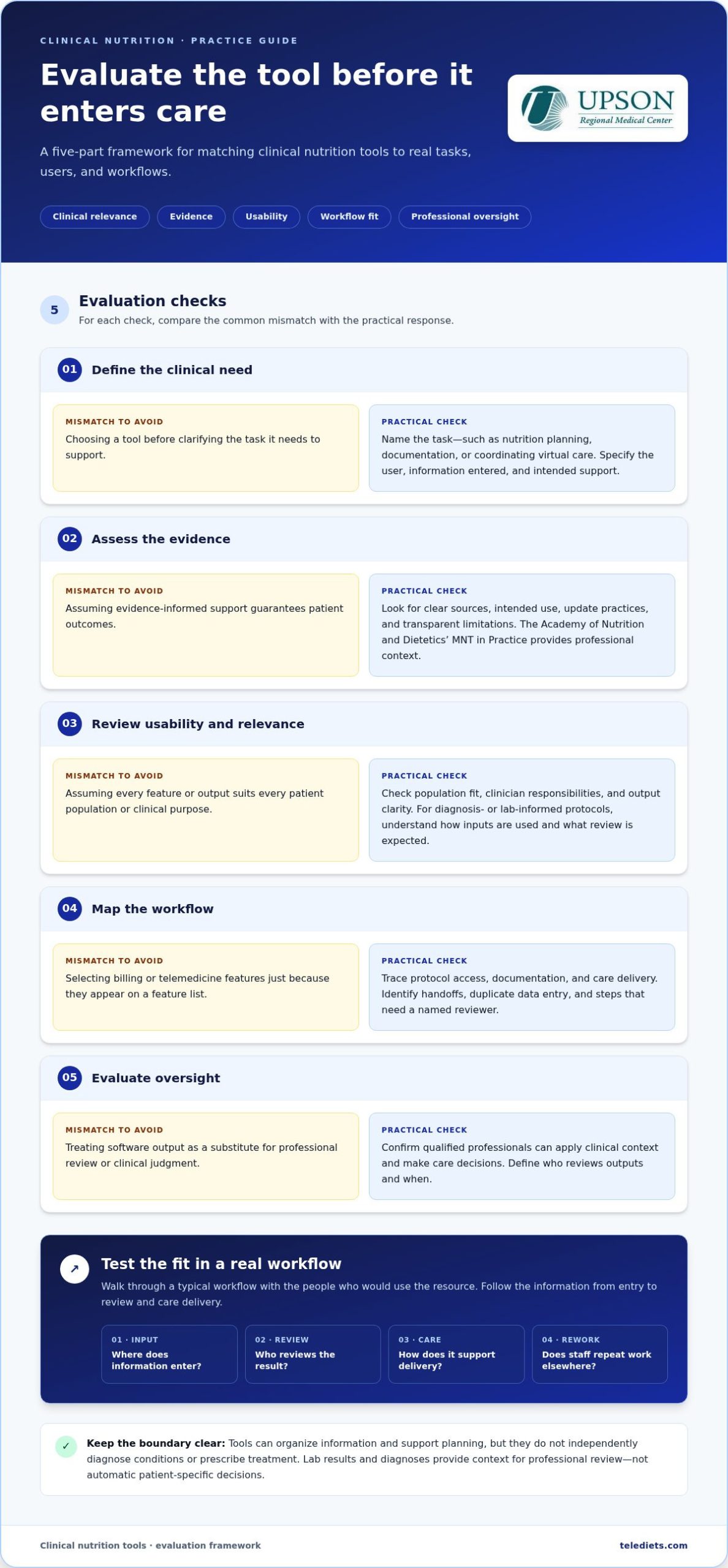
Fit the tool to the clinical task, not the other way around. A useful evaluation considers who the tool is for, what decisions or workflow steps it supports, and where professional judgment remains necessary. Use this framework to compare clinical nutrition therapy tools against your practice’s actual needs.
- Define the clinical need. Identify the task first, such as organizing nutrition planning, supporting documentation, or coordinating virtual care. Specify who will use the tool, what information they need to enter, and what it should help them do.
- Assess the evidence. Look for clear sources, intended use, update practices, and transparent limitations. The Academy of Nutrition and Dietetics’ Medical Nutrition Therapy (MNT) in Practice offers context for professional MNT. Evidence-informed support can guide practice, but it doesn’t guarantee patient outcomes.
- Review usability and relevance. Consider whether the tool supports your patient population and fits clinicians’ responsibilities. If it uses diagnoses or lab data to inform protocols, understand how those inputs are used and what review is expected. Check that outputs are clear enough for the intended users, and don’t assume a feature is validated for every clinical purpose.
- Map the workflow. Trace how staff access protocols, document work, and coordinate care delivery. Identify handoffs, duplicate data entry, and any steps that need a named reviewer. Billing support or telemedicine features are valuable when they address real operational needs, not simply because they appear in a feature list.
- Evaluate oversight. Confirm that qualified professionals can review outputs, apply clinical context, and make care decisions. Define who is responsible for that review and when it happens. The tool should assist the team, not replace its judgment.
Check the fit before adopting
Walk through a typical workflow with the people who would use the resource. Note where information enters, who reviews it, how the result supports care delivery, and whether staff need to repeat work in another system. This can reveal friction that a feature checklist misses. TeleDIETS brings provider-facing nutrition protocol support together with billing tools and telemedicine workflow features. Read about TeleDIETS clinical nutrition software.
How Clinical Nutrition Tools Fit a Clinician-Led Workflow
Clinical nutrition therapy tools work best as part of a clear handoff, from assessment through follow-up. They can organize information and reduce repetitive planning tasks, but automation doesn’t replace clinical judgment. Lab results and diagnoses add context for professional review; they aren’t instructions for making automatic patient-specific decisions.
- Assess: The clinician reviews relevant information and identifies the nutrition-care need.
- Select: The care team chooses a resource or protocol suited to the task and setting.
- Review: A qualified professional checks the tool’s output, applies clinical context, and adapts it as appropriate.
- Deliver: The team shares the reviewed plan through its care-delivery process, which may include telemedicine.
- Follow up: Clinicians revisit the plan as care progresses and determine whether adjustments are needed.
Where can digital protocols support care delivery?
Protocol generation can give clinicians a structured starting point based on available information, such as lab data and diagnoses. The professional still decides whether that material is relevant, how it should be adapted, and whether it fits the care context. Digital support can make repeatable steps more consistent, while clinician review keeps decisions grounded in the individual assessment. For general nutrition education, teams can also use resources such as Official USDA Nutrition Information, while distinguishing broad public information from clinical decision-making.
How can teams connect planning with delivery and reimbursement?
Map how a reviewed protocol moves from the clinician to the staff responsible for documentation, virtual delivery, and follow-up. Clear handoffs help teams understand who prepares information, who reviews it, and how care is documented. Billing and CPT coding tools can support administrative workflow, but they don’t guarantee coverage or reimbursement. TeleDIETS brings provider-facing nutrition protocol support together with billing tools and a telemedicine plugin. See how TeleDIETS supports clinician-led nutrition workflows.
How TeleDIETS Supports Clinical Nutrition Therapy Workflows
TeleDIETS is medical nutrition therapy software for healthcare professionals, not a consumer meal service. It supports provider workflows by generating personalized nutrition protocols using patient lab data and clinical diagnoses. Those inputs provide context, but they don’t replace assessment or professional judgment. Clinicians review the protocol and determine how it fits their care approach.
Which provider-facing capabilities does TeleDIETS bring together?
TeleDIETS is available as a SaaS application or AI engine. Its protocol options include Standard Series Meal Plans, Advanced Medical Series Meal Plans, and GLP-1 Meal Plan Protocols. These are provider-facing planning resources, not promises of treatment results or medication outcomes.
The platform also brings together insurance billing and CPT coding tools, plus a telemedicine plugin to support care-delivery workflows. For a clinic, this connects nutrition protocol planning with administrative tasks and virtual delivery in one provider-focused toolset. Billing features support workflow, but don’t guarantee coverage or reimbursement. The telemedicine plugin supports provider workflows without implying a specific EHR connection.
What is a practical next step for a clinic?
Start by mapping your current medical nutrition therapy process. Identify where clinicians assess needs, develop or review protocols, handle billing documentation, and deliver care, including through telemedicine where appropriate. Then decide which steps your team wants software to support and where clinician review must remain explicit. This makes it easier to judge whether a platform’s capabilities align with real operational priorities.
If you’re exploring clinical nutrition therapy tools that connect protocol planning with billing and telemedicine support, compare those capabilities with the workflow your team has mapped. Keep clinical oversight and your defined operational needs at the center of the decision.
Make Your Next Workflow Improvement Deliberate
Your next step doesn’t need to be a full practice overhaul. Choose one point in your nutrition-care workflow where a clearer process could help, then define what clinicians and operations staff need from a tool at that stage. This keeps technology decisions connected to care responsibilities rather than features alone.
The right clinical nutrition therapy tools should support consistent work while leaving assessment, interpretation, and care decisions with qualified professionals. For practices exploring a provider-facing option, TeleDIETS is available as a SaaS application or AI engine, with diagnosis- and lab-informed protocols, insurance billing and CPT coding tools, and a telemedicine plugin.
Consider how those capabilities align with your team’s priorities and existing care delivery. Explore TeleDIETS for clinical nutrition workflows as a practical next step. A thoughtful fit can help your team move forward with clarity while keeping clinician-led care at the center.
Frequently Asked Questions
What are clinical nutrition therapy tools?
Clinical nutrition therapy tools are resources that help qualified care teams carry out specific nutrition-related tasks. They may include screening forms, reference materials, calculators, education resources, or software used in a clinical workflow. For example, a screening form can structure information gathering, while a reference resource can help a clinician locate guidance. The appropriate tool depends on the task and the professional using it.
Can clinical nutrition tools replace a registered dietitian or physician?
No. These tools can help organize information or support a repeatable process, but they can’t take responsibility for professional assessment, interpretation, and care decisions. A clinician must determine whether an output is relevant, appropriate, and within their role. Clinics can make this boundary clear by defining who reviews tool-generated material and who authorizes its use in care.
How should a clinic evaluate clinical nutrition software?
Start with the job the software must perform, then assess its intended users, evidence sources, limitations, and practical usability. Ask staff who will use it to walk through a relevant task, such as preparing documentation or reviewing a nutrition protocol. Note any extra steps, unclear outputs, or review requirements. Choose based on task fit and the clarity of the workflow, not the product label alone.
Can clinical nutrition tools use lab results and diagnoses?
Yes, some provider-facing platforms use lab results and diagnoses as inputs to support nutrition protocol planning. Those data points are context, not a substitute for interpreting the full clinical picture. Teams should consider whether the information is current and relevant, who checks it, and how a clinician reviews any resulting material before it informs care. Tools should not be treated as independently making patient-specific decisions.
Are clinical nutrition therapy tools the same as meal-planning apps?
No. Clinical tools are intended to support professional tasks and clinician-led workflows, while a meal-planning app may be designed for personal food organization. A useful distinction is the intended user and purpose: does the resource support assessment, documentation, or care planning under professional oversight, or is it primarily for individual tracking? That difference helps clinics select resources suited to their responsibilities.
Leave a Reply