
Functional medicine software should connect clinical personalization with the practical work of running a nutrition practice. The right nutrition software for functional medicine practitioners supports plans tailored to lab results and diagnoses, while helping you manage documentation and payment workflows.
Flexibility matters in functional medicine: patients’ needs vary, and a practice may serve cash-pay clients, bill insurance, or use both models. Nutrition software is most useful when its planning tools suit your care approach and its billing capabilities fit the way your practice operates.
This guide explains the capabilities to assess, including personalized plan creation, cash-pay and insurance workflows, and features that can suit practices at different stages of growth. You’ll also see how meal plan protocols and billing tools can support a more consistent workflow, so you can focus on choosing software that fits your clinical and operational needs.
Key Takeaways
- Match billing tools to your practice model so cash-pay workflows and insurance claims are easier to manage.
- Look for plan-building capabilities that can reflect clinical information and support individualized nutrition care.
- Assess how your client volume and workflow may change as your practice grows, then prioritize software that fits those needs.
- Consider how nutrition planning and billing features can support a more coordinated approach to integrative care.
Can nutrition software handle both cash-pay and insurance billing?
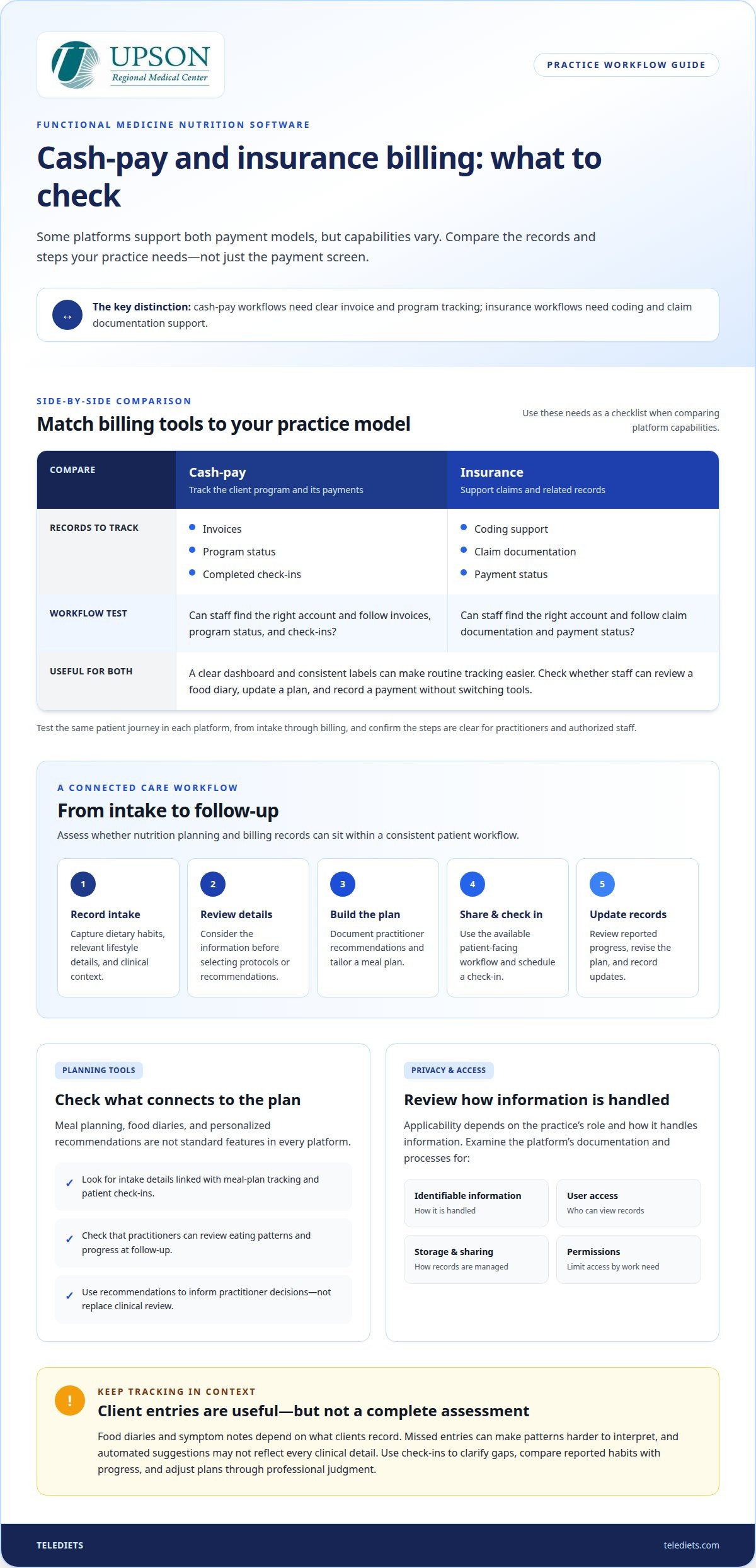
Yes. Some platforms support cash-pay workflows and insurance billing, but capabilities vary. Cleveland Clinic compared 5,657 primary care patients with patients at its Center for Functional Medicine. That comparison highlights why functional medicine records may need more than payment details. For cash-pay care, track invoices, program status, and completed check-ins. For insurance workflows, look for coding support, claim documentation, and payment status.
Compare platforms by following one workflow from intake through billing. Can staff record dietary habits, document progress, and find the right account without switching tools? A clear dashboard and consistent labels make routine tracking easier. Test a typical task, such as reviewing a food diary, updating a plan, and recording a payment. The steps should be clear to practitioners and authorized staff.
Meal planning, food diaries, and personalized recommendations are not standard features in every platform. Look for tools that connect intake details with meal plan tracking and patient check-ins. For example, a practitioner might document eating patterns, set a nutrition plan, then review progress at follow-up. Recommendations should inform practitioner decisions, not replace a review of clinical context.
When assessing privacy and health information management, review how software handles identifiable information, user access, storage, and sharing. Applicability depends on the practice’s role and how it handles information. Examine the platform’s privacy and security documentation, access controls, and records-management process. Permissions-based access helps limit information to team members who need it for their work.
To create and share a plan, first record intake details and relevant lifestyle habits. Next, review the information, select appropriate protocols, and document the practitioner’s recommendations. Share the plan through the platform’s available patient-facing workflow, then schedule a check-in to capture progress. This creates a usable record of the plan and subsequent updates.
Tracking has limits: food diaries and symptom notes depend on what clients record. Missed entries can make patterns harder to interpret, while automated suggestions may not reflect every clinical detail. Use check-ins to clarify gaps, compare reported habits with progress, and adjust plans through professional judgment. This keeps nutrition and wellness tracking connected to the individual’s care rather than treated as a complete assessment.
Personalized nutrition plans
A personalized nutrition plan connects a patient’s clinical context with practical eating guidance. Functional medicine practitioners may consider nutritional imbalances and possible contributors to chronic disease. A platform can organize lab results, diagnoses, food preferences, and documented goals alongside meal plans. The practitioner reviews these details before deciding what guidance to provide, keeping the plan linked to the patient’s documented needs.
Build a nutrition care plan by moving from assessment to clear, reviewable actions. Summarize relevant clinical information and the patient’s current eating pattern, then define nutrition goals and select suitable food-based strategies. Document the rationale, recommendations, and follow-up measures. For example, a plan might set an agreed meal structure and record progress for discussion at the next appointment.
Therapeutic food plans should translate clinical priorities into practical choices. A practitioner might organize meal guidance around a diagnosis, relevant lab findings, and the patient’s preferences. The plan should explain practical steps, such as how to structure meals or track selected habits. A template is not a complete assessment: practitioner review keeps recommendations connected to the clinical context.
Useful software makes each plan easy to tailor and update. Look for reusable frameworks that allow practitioner edits, clear documentation, and patient-friendly sharing. At follow-up, compare the original goals with reported eating patterns and progress. If circumstances change, revise the plan and record the updates. This supports continuity across appointments without confusing a standard framework with individualized care.
For practices seeking structured support for clinician-guided meal plans, explore medical nutrition plan frameworks as one way to organize recommendations. Keep the practitioner’s assessment and the patient’s documented needs central to every plan.
Look for software that connects clinical details, food preferences, and goals with meal plans practitioners can tailor and update. It should also support recording eating patterns and progress for review at follow-up.
Choosing software by client volume and practice needs
The best fit is the platform that supports your clinical workflow, not necessarily the one with the most features. A solo practitioner may prioritize efficient intake, clear patient records, and simple plan updates. A clinic with multiple practitioners may need role-based access and shared documentation. Compare platforms by testing the same patient journey, from intake through follow-up.
Start with the tasks your team repeats. For a new patient, can staff collect relevant history, record goals, and prepare a visit summary? At follow-up, can the practitioner find prior notes and update the plan without duplicating information? These steps show whether the platform can support your workload and keep clinical details organized as caseloads change.
Next, match features to your practice’s care model. If a practitioner discusses supplements, they may need a clear place to document recommendations and review them later. A nutrition-focused associate may need access to relevant records without changing the practitioner’s clinical decisions. Connected notes can help an integrative care team see how nutrition guidance relates to the broader plan.
Use a short evaluation process before adopting software:
- List routine tasks, such as intake, documentation, plan delivery, and follow-up.
- Run a sample patient record through each task using realistic practice scenarios.
- Ask an associate to repeat the workflow and note any confusing steps.
- Identify which functions are essential now and which would support future growth.
Finally, consider how the platform handles exceptions. One patient may need an updated plan after new clinical information, while another may require a different follow-up workflow. Software should make changes easy to document and find. Choose based on actual tasks, staff roles, and care priorities, rather than focusing on features your practice rarely uses.
Compare platforms against your practice’s tasks and roles. Solo practitioners may value straightforward intake, records, and plan updates, while clinics may need shared documentation and role-based access. Judge ease of use by running a realistic patient journey through each system and asking staff to repeat it, so confusing steps become clear.
Integrative, holistic, and nutrition practice support
Integrative care often brings nutrition guidance together with a patient’s health history, laboratory findings, and broader care plan. Software can support this process by organizing relevant notes in one record. For example, a practitioner can document a nutrition recommendation alongside its clinical context and revisit both at follow-up. This makes connections between care decisions easier to review over time.
When evaluating integration with electronic health records, lab testing, or practice management systems, check the capabilities of the specific platform. Determine whether information transfers directly or must be entered manually, then map the workflow from lab result to patient record and follow-up note.
For supplements, distinguish documenting a recommendation from managing a dispensary. A nutrition platform may record supplement guidance alongside food recommendations, but dispensary ordering is a separate capability. Which software supports both? Look for systems that explicitly connect recommendation documentation with the dispensary workflow your practice uses.
Before adopting software, trace a realistic patient journey. Start with intake and health history, add relevant lab findings, document nutrition recommendations, then record follow-up observations. If a practitioner discusses a supplement, include its purpose in the record and note the patient’s response at a later visit. This sequence can reveal gaps between clinical documentation and operational tools.
Membership programs also shape the workflow. A practice may need to track enrollment, planned touchpoints, and completed nutrition activities alongside individual visits. Compare how each platform organizes those records and whether team members can find the latest recommendations without searching across disconnected systems. Clear documentation keeps the patient’s nutrition plan visible during ongoing care.
Choose software around the systems and tasks your practice relies on, not a broad label such as “holistic.” Map essential connections first, then assess how records move between clinical, nutrition, and practice-management workflows. To explore structured nutrition planning for clinical practice, review nutrition planning options.
Integration depends on the platform and the systems your practice uses. Check whether lab and other information moves directly into the patient record or requires manual entry, and test the path from lab results through documentation to follow-up.
TeleDIETS
TeleDIETS supports healthcare professionals who need nutrition planning and practice workflows in one place. The platform helps practitioners prescribe evidence-based nutritional plans tailored to lab results and clinical diagnoses. Its Standard Series and Advanced Medical Series meal plans provide structured options, while insurance billing and CPT coding tools support nutrition services.
Offerings include Standard Series Meal Plans, Advanced Medical Series Meal Plans, and GLP-1 Meal Plan Protocols, alongside Insurance Billing & CPT Coding Tools. These options support different clinical nutrition needs and billing workflows, while the practitioner remains responsible for applying clinical judgment to each patient’s care.
If you’re assessing how TeleDIETS could fit your practice, contact the team to discuss the platform and your workflow.
Make your next software decision with confidence
Choosing nutrition software for functional medicine practitioners is an opportunity to shape how your care model works day to day. Before making a change, identify the workflow you want to improve first, such as organizing clinical information, preparing nutrition plans, or coordinating billing tasks. A clear priority helps you assess whether a platform supports the way your practice delivers care.
Then consider how adoption would fit your team’s routine. Decide who will use the system, which processes should remain consistent, and how you’ll introduce changes to staff. Starting with a focused workflow can make it easier to build a practical process and refine it as your needs evolve.
TeleDIETS supports healthcare professionals with evidence-based nutrition plans and tools for practice workflows. If you’re ready to discuss how its capabilities may fit your practice, contact TeleDIETS to discuss your practice. A thoughtful next step can help you move forward with clarity.
Frequently Asked Questions
What does a functional nutrition practitioner actually need from software?
A practitioner needs a reliable way to connect clinical notes with nutrition recommendations and follow-up. Prioritize customizable records, clear plan documentation, and a workflow that makes changes easy to locate. For example, after a patient reports a change in eating habits, the practitioner should be able to record the update alongside the relevant recommendation and revisit it at the next appointment.
Can I run elimination and reintroduction phases in coaching software?
Software can help document practitioner-defined elimination and reintroduction phases when it supports editable plans and dated check-ins. Record the foods or categories involved, the phase, patient-reported observations, and any plan changes. For example, a follow-up entry can distinguish a food removed from one being reintroduced. The practitioner determines the clinical approach; software keeps the notes and timeline organized.
What About Meal Plan Tracking?
Meal plan tracking works best when each patient’s current plan and later changes are easy to distinguish. Record when a plan is shared, the goals it supports, and follow-up observations about how it fits the patient’s routine. If preferences or circumstances change, document the revision so the next review reflects the current plan, not an older version or incomplete recollection.
What features should nutrition software for functional medicine practitioners include?
Look for adaptable patient records, plan documentation, progress check-ins, and workflows that fit your practice’s clinical and administrative needs. A useful platform makes relevant notes easy to find, recommendations straightforward to update, and the care journey clear for authorized team members. Choose features around actual tasks, such as managing follow-up notes or coordinating a plan across practitioner visits.
How do functional medicine nutrition software options compare in features and ease of use?
Features vary, so compare cash-pay and insurance workflows, personalized plan tools, documentation, and role-based access. Test a realistic patient journey from intake through follow-up, and ask staff to repeat it to identify confusing steps.
Leave a Reply