
An allergy-safe meal decision begins before the tray reaches the patient. Software for managing food allergies in patients can help clinical teams organize reaction information, share it with relevant care professionals, and screen meal choices against documented allergens and dietary restrictions. Allergy clinic software is most useful when it connects those steps rather than treating meal selection as separate from the patient’s allergy history.
That coordination matters: a reaction record is useful during meal planning only when the people selecting or reviewing meals can access it. A well-designed workflow makes allergy details easy to find while keeping other dietary needs in view.
This article explains what allergy clinic software does, how reaction information can be shared, and how allergen checks can fit into meal selection. It also covers managing dietary restrictions alongside allergies, so you can assess where these tools support clinical workflows and where nutrition planning fits.
Key Takeaways
- Keep reaction details accessible to the care professionals involved, while preserving the EHR as the record of clinical decisions.
- Build allergen screening into meal selection so documented allergies can inform choices before meals are finalized.
- Track dietary restrictions separately from allergies, then consider both when planning suitable meals.
- Assess app costs by looking at what the tool covers and how it fits your clinical workflow, not price alone.
Sharing reaction information with healthcare professionals
A clear reaction record helps clinicians connect symptoms with foods, timing, and care decisions. A practical workflow captures those details once and makes them available to the professionals involved.
Apps and Clinical Platforms
Food allergy apps typically help patients record reactions or track exposures; clinical platforms support documentation and coordination across care. An app can complement an electronic health record (EHR), but it does not replace the EHR as the record of clinical decisions. EHRs are designed to share information with other healthcare organizations and patients.
For example, a reaction entry can include the suspected food, symptom, timing, and what happened next. A clinician can review the account, add clinical context, and document decisions in the EHR. If an app tracks oral immunotherapy (OIT), it still functions alongside the EHR rather than replacing it. Keep patient-reported observations distinct from clinician assessments so each record’s role remains clear.
Regulations and Guidelines
U.S. requirements can depend on a system’s role and the information it handles. No single software feature, by itself, defines appropriate food allergy management. To assess a platform, review how it controls access, shares records, and protects patient information under your organization’s applicable requirements.
Security belongs in the workflow, not as an afterthought. Review who can view or update a reaction record, how patient information moves between an app and the EHR, and how access changes when staff responsibilities shift. A patient’s symptom entry, for example, should remain distinguishable from a clinician’s treatment decision. Clear permissions and documentation practices help teams handle sensitive information deliberately while preserving a useful clinical record.
Allergen checks during meal selection
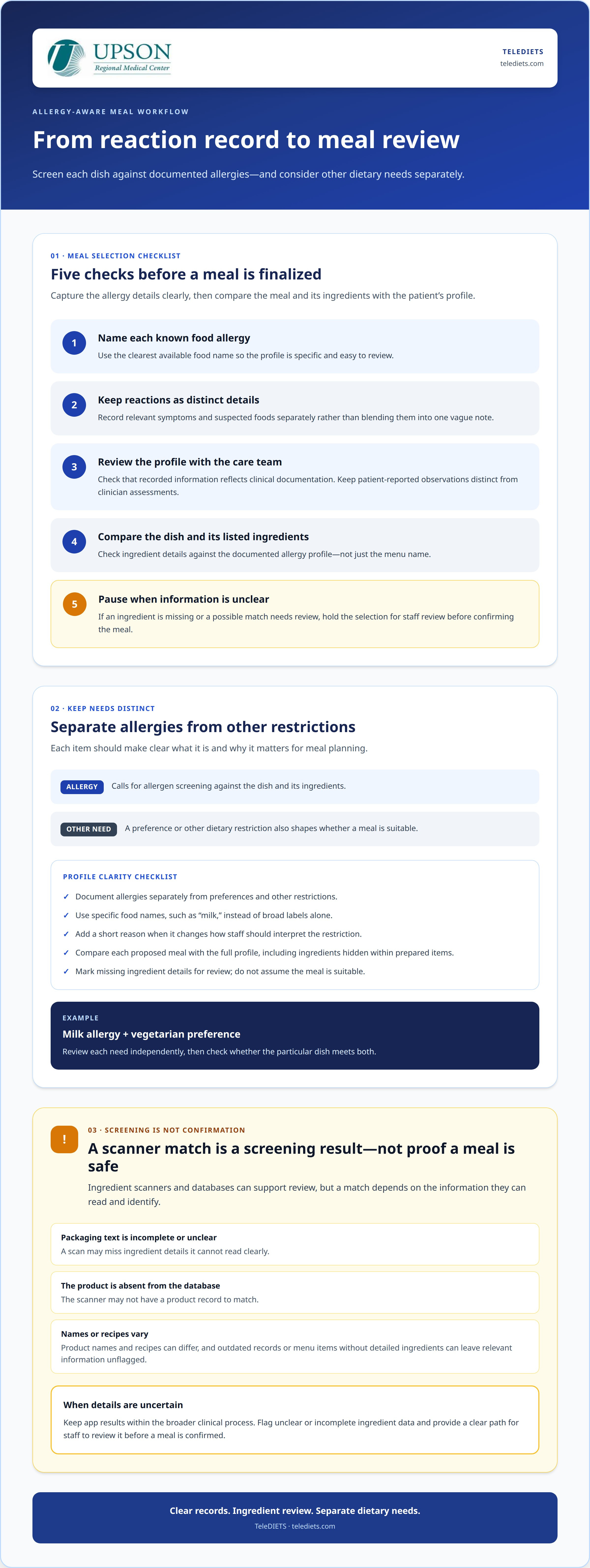
Meal screening works best when a patient’s documented allergies are compared with the ingredients in each available dish. Software for managing food allergies in patients can make this comparison part of meal selection. For example, a recorded peanut allergy should prompt a review of a dish’s ingredient details, not just its menu name. Medication information may also belong in the clinical record, but it does not replace allergen screening.
Food allergen scanners and ingredient databases can support this review, but their accuracy depends on the information they can read and match. A scan may miss details if packaging text is incomplete or unclear, or if the product is absent from the database. Product names and recipes can vary, too. Treat a match as a screening result, not proof that a meal is safe. Software for managing food allergies in patients should flag unclear or incomplete ingredient data for review.
Relying on an app alone can create risk if an allergy profile is incomplete, a product record is outdated, or a menu item lacks detailed ingredients. A missed match could leave a relevant ingredient unflagged. Keep app results within a broader clinical process, with a clear path for staff to review uncertain ingredients before confirming a meal.
For a patient-facing app, use a structured setup that makes allergy details specific and easy to review:
- Enter each known food allergy using the clearest available food name.
- Record relevant reaction symptoms and suspected foods as separate details.
- Review the profile with the care team so recorded information reflects clinical documentation.
- During meal selection, compare the dish and its listed ingredients against the profile.
- Pause selection when ingredient information is missing or a possible match needs review.
For clinics pairing meal planning with documented medical needs, Advanced Medical Series Meal Plans can support structured nutrition planning alongside allergy-aware review.
Dietary restrictions alongside allergies
A meal profile should distinguish food allergies from other dietary restrictions. For example, a patient may need to avoid a diagnosed allergen and follow a vegetarian eating pattern. Keeping these needs separate helps care teams understand why each item matters. An allergy calls for allergen screening, while a preference or other restriction shapes meal suitability. Combining both in one vague note can obscure the reason behind a selection.
Record each restriction with enough detail to guide meal planning. “Avoid dairy” may reflect an allergy, intolerance, or personal choice, and these situations should not be treated as interchangeable. A useful record identifies the restriction type, the foods involved, and relevant clinical context. For instance, “milk allergy” is clearer than “dairy-free” alone. Clear labels help staff interpret menus and ingredient lists without guessing.
Consider how restrictions interact when reviewing a meal. A dish might meet a patient’s vegetarian preference but contain an allergen, or exclude a known allergen while conflicting with another dietary need. Hidden ingredients and compound items can complicate the review. Mark uncertain ingredients as needing review rather than assuming the meal is suitable. This makes the decision process visible to the staff responsible for selection.
A consistent workflow can organize information before meal choices are made:
- Document allergies separately from preferences and other restrictions.
- Use specific food names, such as “milk,” instead of broad labels alone.
- Include a short reason when it changes how staff should interpret the restriction.
- Compare each proposed meal with the full profile, including ingredients that may be hidden within a prepared item.
- Mark missing ingredient details for review instead of treating them as a clear match.
For example, a patient’s record may list a milk allergy and a vegetarian preference. Review both independently, then assess whether a particular dish meets both needs. A structured profile supports that comparison without suggesting a preference carries the same clinical meaning as an allergy. It also gives clinicians a clearer basis for updating meal instructions when the patient’s documented needs change.
Cost of food allergy management apps in the US
Food allergy app costs in the United States depend on the tool’s purpose. A patient-facing app focused on recording reactions has different needs from a clinic platform supporting documentation, meal screening, and team workflows. Compare not just price, but whether the features match the intended users and tasks.
For an individual patient, review which functions are included, such as allergy profile storage, reaction logging, or ingredient lookup. A tool with a narrow purpose may suit a simple tracking workflow, while a clinic may need shared access and connections with existing records. These differences affect the product’s scope and cost structure.
For a healthcare organization, assess the full operating model before comparing options. Costs may reflect the number and type of users, implementation requirements, integration work, data management, and ongoing support. For example, a platform used by several care roles may require different access controls and setup than a personal app used by one patient. These are cost factors, not a universal price formula.
Use a practical review to compare value across tools:
- List the actual tasks, such as logging reactions or screening meal ingredients.
- Separate patient features from clinic workflow and administrative functions.
- Identify whether the system must connect with an EHR or other clinical records.
- Include setup, staff training, maintenance, and support in the cost discussion.
- Compare the scope of each option against the people who will use it.
For a clinic, the right choice depends on how the app fits existing documentation and meal-selection processes. A patient-only tracker may help capture observations but will not necessarily support clinical coordination. A broader platform may include functions the clinic does not need. Define the use case first, then weigh costs against required capabilities, workflow fit, and the effort needed to keep records current.
TeleDIETS
TeleDIETS supports healthcare professionals with medical nutrition therapy plans that can complement allergy-aware meal planning. Its Standard Series and Advanced Medical Series Meal Plans help clinicians incorporate nutrition needs into care workflows, while GLP-1 Meal Plan Protocols address a separate clinical planning need. These offerings support nutrition planning; they don’t replace allergy documentation or ingredient screening during meal selection.
Consider TeleDIETS when your practice needs structured meal plans alongside its existing process for recording allergies and reviewing foods. Its Insurance Billing & CPT Coding Tools can also support related practice administration. Keeping these functions distinct helps teams understand what their nutrition planning platform covers and why allergy records and meal checks remain essential.
Contact TeleDIETS to discuss how its medical nutrition therapy tools may fit your practice’s workflow.
Build a workflow your team can sustain
Choosing software for managing food allergies in patients is ultimately a workflow decision: the tool should fit how your practice records clinical information and plans nutrition care. Define where allergy documentation ends and meal planning begins, then identify the tasks a platform should support. Include clinical and administrative stakeholders so ownership of each step is clear. This helps you assess options without treating an app as a substitute for clinical judgment or a complete nutrition workflow.
For practices strengthening medical nutrition therapy, align software decisions with the broader process for developing nutrition plans. TeleDIETS supports healthcare professionals with evidence-based nutrition planning, while your team continues using its established allergy documentation and meal review procedures. The goal is a clear path from recorded needs to nutrition planning, without assuming one tool handles every part of care.
Connect with TeleDIETS to discuss how its tools could fit your practice. A thoughtful next step can help your team shape a workflow that is clear, usable, and responsive to patient needs.
Frequently Asked Questions
What Is Allergy Clinic Software?
Allergy clinic software helps care teams organize allergy-related information and support workflows such as documenting reactions or reviewing meal choices. Its role depends on the platform: a patient app may collect observations, while clinical systems support care documentation. For example, a patient’s food and symptom notes can inform a clinical discussion, with care decisions recorded in the appropriate clinical record.
What software helps patients track and manage food allergies?
Patients can use food allergy apps to log suspected triggers, symptoms, and exposure details for later review. A useful entry might describe the food, when it was eaten, and the reaction observed. These tools can organize personal notes, but they serve a different purpose from clinical records. Choose a format the patient can use consistently and discuss relevant entries during care.
What features should food allergy management apps include?
Useful features include a structured allergy profile, reaction logging, and a way to record foods or ingredients linked to an event. Patients may also benefit from entries that capture context, such as where a meal was eaten or whether its ingredients were clear. For clinical use, consider whether the app distinguishes patient-entered observations from information added by healthcare professionals.
Are food allergy apps HIPAA-compliant and how do they protect health data?
Do not assume every food allergy app has the same privacy protections or compliance status. App functions and data practices vary, so review how a product handles account access, information sharing, storage, and deletion. For a clinic workflow, consider who can view or change records and how patient-entered details are separated from clinical documentation. Legal compliance questions require appropriate organizational or legal guidance.
Can food allergy software share allergy records with doctors, schools, or caregivers?
Some tools support information sharing, but recipients and methods depend on the system. Electronic health records are designed to share information with other healthcare organizations and patients. Sharing with a school or caregiver may require a separate app feature or process. Before relying on a shared record, clarify who can access it and whether the information is current and appropriate for that recipient.
Leave a Reply