
What happens when an ingredient isn’t in the USDA database? The answer depends on how a platform handles foods beyond its built-in records, so lab-based dietary recommendations software should be compared on more than database size. The USDA nutrient database lists values per 100 grams for thousands of raw and processed food items. For an ingredient that isn’t represented, the key comparison is how each option lets you account for it in your analysis.
Lab-based dietary recommendations software should do more than store food data. When comparing options, assess how each uses clinical inputs, supports meal planning, fits your practice setting, and handles documentation and billing. This guide focuses on those workflow decisions, so you can identify software that supports your clinical nutrition services.
Key Takeaways
- Assess food database coverage and how each platform handles ingredients that aren’t included in its standard records.
- Compare meal-planning and recipe-analysis workflows to see which features support your clinical recommendations.
- Match software capabilities to your practice setting, patient-care workflow, and administrative needs.
- Weigh pricing alongside the features you’ll use, so you can compare overall fit rather than cost alone.
Nutrition analysis and food composition databases
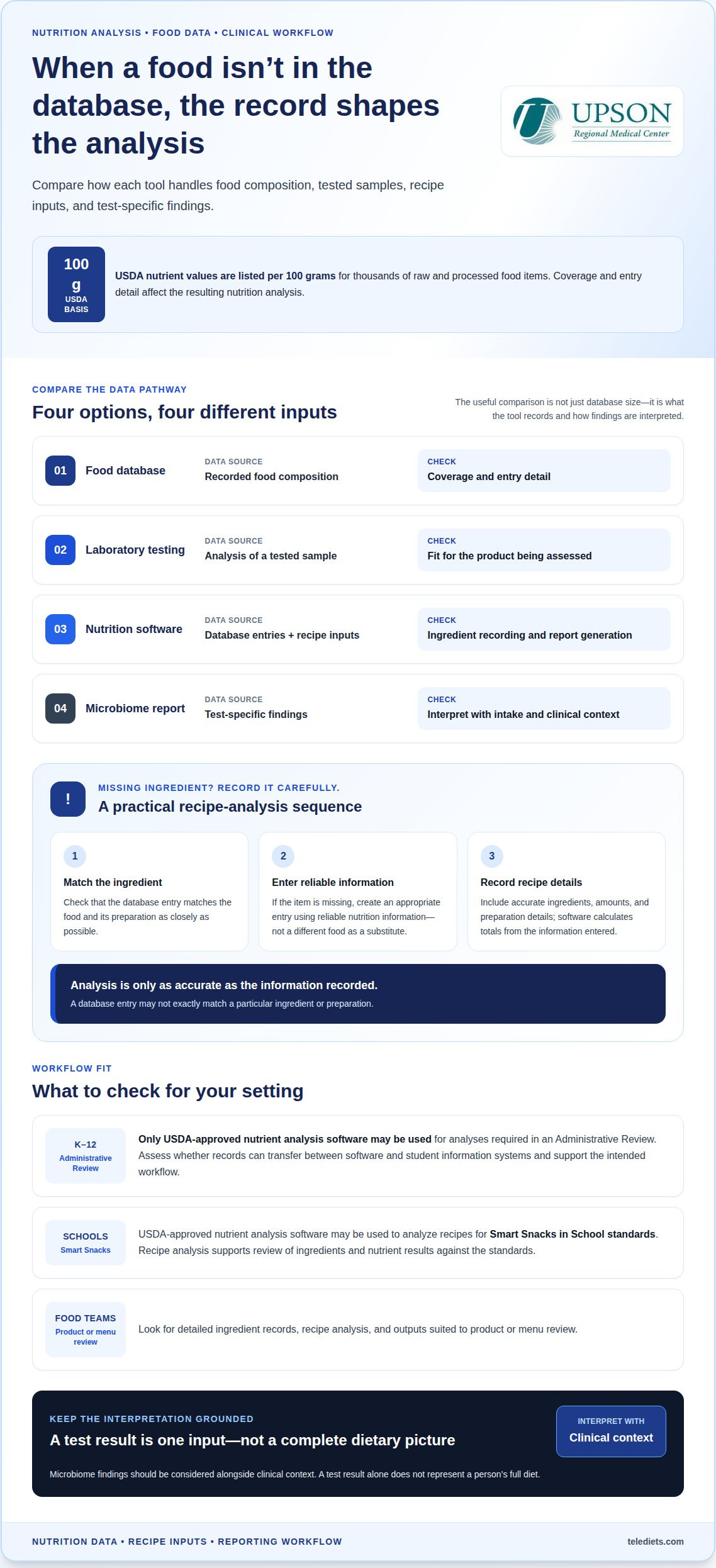
The USDA nutrient database lists values per 100 grams for thousands of raw and processed foods. A lab-based dietary recommendations software platform may use food records to generate nutrition analysis, but database coverage and entry detail affect the result. For Nutrition Facts label values, the FDA recognizes two methods: laboratory testing and database analysis.
Recipe nutrient analysis depends on accurate ingredients, amounts, and preparation details. Software calculates nutrient totals from the food data entered, so check that the database entry matches the ingredient and preparation as closely as possible. If an item is missing, create an appropriate entry using reliable nutrition information instead of substituting a different food. The resulting analysis is only as accurate as the information recorded.
| Option | Data source | Useful comparison criterion |
|---|---|---|
| Food database | Recorded food composition | Coverage and entry detail |
| Laboratory testing | Analysis of a tested sample | Fit for the product being assessed |
| Nutrition software | Database entries and recipe inputs | Ability to record ingredients and generate reports |
| Microbiome test report | Test-specific findings | How findings are interpreted alongside intake and clinical context |
For K-12 programs, only USDA-approved nutrient analysis software may be used for analyses required in an Administrative Review. Schools may also use student information systems, so assess whether records can transfer between systems and support the intended workflow. Food professionals can compare tools by checking whether they support detailed ingredient records, recipe analysis, and outputs suited to product or menu review.
Does health insurance cover nutrition testing or lab-based diet recommendations? Coverage depends on the patient’s plan and the service billed; testing and nutrition services may be treated differently. TeleDIETS provides insurance billing and CPT coding tools to support practice workflows, but coverage for an individual service depends on the plan and claim.
What are the risks and limitations of lab-based dietary recommendations? Food database entries may not exactly match a particular ingredient or preparation, and a test result alone does not represent a person’s full diet. Microbiome findings also require interpretation alongside clinical context, rather than serving as a complete dietary plan.
Meal planning and recipe development
A useful nutrition-planning workflow connects clinical recommendations and patient preferences with practical meals. Clinicians can select meal plans, review portions, and adapt recommendations to the patient’s needs. For example, a familiar breakfast may be retained while ingredients and serving details are adjusted. Software should make updates manageable without requiring clinicians to rebuild the entire plan.
Recipe development relies on consistent ingredient and portion records. Clinicians can enter a recipe, review its ingredients, and adjust serving quantities before using it in a plan. Recording changes helps keep recommendations aligned with their intended nutrition goals. Look for workflows that make meal plans easy to review and revise, rather than treating each plan as a separate project.
Patient-facing meal plans should be clear and practical. They should present meals and portions in a format patients can understand and use after an appointment. Assess whether the software can produce a personalized plan and make later revisions straightforward. For example, a clinician may update one meal while keeping the rest of the plan intact.
For K-12 programs, recipe analysis has a specific compliance use: USDA-approved nutrient analysis software may be used to analyze recipes for Smart Snacks in School standards. This is distinct from general menu planning. A school food team can use recipe records to review ingredients and nutrient results against the standards, then revise the recipe or menu as needed. The software’s approval status matters for this purpose.
Compare vendors by how each supports recipe entry, menu assembly, client-ready plans, and revision tracking. A clinic may prioritize individualized meal plans, while a school food program may focus on recipe analyses and compliance workflows. Use a sample menu to assess how easily staff can develop, update, and share plans. Choose the option whose planning process best matches your programs and daily work.
Software choices by practice setting
What are the best lab-based nutrition and diet recommendation software platforms in the United States? There is no universal ranking: the right fit depends on your clinical setting and workflow. Compare platforms by how they use clinical information, support documentation, and help your team deliver nutrition services.
An independent clinician may need software that organizes clinical information and supports individualized recommendations without unnecessary steps. A group practice may prioritize shared workflows, consistent documentation, and coordination across staff. In either setting, assess how easily clinicians can review patient inputs, generate nutrition plans, and document their clinical reasoning.
Telehealth practices should consider how software fits into remote care. A clinician may review patient information, prepare nutrition recommendations, and document follow-up as part of a connected workflow. TeleDIETS offers a telemedicine plugin to integrate nutrition protocols into provider workflows. Assess whether the platform’s functions match the way your practice delivers care.
Practices that bill for nutrition services should assess how documentation connects with insurance workflows. Identify who verifies benefits, records clinical information, prepares claims, submits them, and manages denials. TeleDIETS includes insurance billing and CPT coding tools to support these steps. Clear responsibilities help your team determine how the platform fits into its current process.
What privacy, consent, and regulatory rules apply to lab-based dietary recommendation software in the U.S.? Before storing client health data, U.S. practitioners should confirm that the software vendor will sign a Business Associate Agreement. Practices should also define how they obtain consent, limit access, and manage records within their own policies.
Use a practical comparison process: map each step from clinical input to recommendation, identify who is responsible, then evaluate software against those needs. A solo practice may value a streamlined individual workflow; a larger team may emphasize shared records and administrative coordination. Compare what each package actually includes, not just the number of features. Select the option that supports your clinical and operational priorities.
There is no universally best platform; the right choice depends on your practice setting and workflow. Compare how each option supports clinical decisions, documentation, team coordination, and the work clinicians handle every day.
Software pricing and feature comparisons
Assess software value by how well its functions support your workflow, not by feature count alone. Pricing can depend on access, selected functions, and practice requirements. Define your needs and request a quote to evaluate the appropriate package. This helps distinguish focused nutrition tools from platforms designed to support broader clinical workflows.
Before comparing vendors, define the software’s purpose. A clinic may need to analyze lab values, document recommendations, and manage follow-up. A food professional may prioritize nutrient analysis and labeling workflows. List essential tasks first, then separate required functions from features that would add little value to daily work.
| Comparison area | What to assess | Why it matters |
|---|---|---|
| Pricing model | Subscription structure and included access | Shows how costs relate to team use |
| Analysis | Inputs, calculations, and report detail | Helps match outputs to clinical or product needs |
| Workflow | Documentation, review, and follow-up steps | Reveals potential duplication across operations |
| Integrations | Available connections and data transfer | Clarifies how information moves between tools |
| Labeling | Nutrition values and output format | Supports relevant food-product tasks |
How do clinicians and consumers use lab-based nutrition software, and what integrations are available? Clinicians use these tools to organize data, calculate nutrition values, and support recommendations; consumers may use client-facing outputs to understand plans. Integrations vary by platform, so compare how each handles data exchange with the systems your workflow already uses.
Use a realistic task to compare options. Enter the same sample information, generate a report, and note the steps needed to review and share it. Then weigh the tool’s functions against its ongoing operational demands. Explore nutrition software options to assess how clinical planning tools may fit your practice.
Software pricing depends on the practice’s access needs and selected features. Define your workflow requirements, then request a quote to assess the package that fits. Compare the functions included with your needs rather than relying on feature counts alone.
TeleDIETS
TeleDIETS is a next step for healthcare professionals seeking to connect lab results and clinical diagnoses with nutrition planning. Its platform enables physicians and clinics to prescribe evidence-based nutritional plans tailored to those inputs within seconds. This can help practices looking for structured recommendations that fit medical nutrition therapy workflows.
Available options include Standard Series Meal Plans, Advanced Medical Series Meal Plans, and GLP-1 Meal Plan Protocols for chronic disease management. Insurance Billing & CPT Coding Tools can also support related practice administration. The right fit depends on your clinical focus and the workflows you want the software to support.
To discuss how TeleDIETS may fit your practice, contact TeleDIETS.
Put your next step into practice
Choosing lab-based dietary recommendations software shapes how your team turns clinical information into nutrition care. Before adopting a platform, define the workflow it should support. Decide who will oversee implementation, how staff will use its recommendations, and how your team will review whether it continues to meet practice needs.
A thoughtful rollout helps your team build confidence in a new workflow. Set a clear purpose, assign responsibilities, and refine the process as staff gain experience. Software should support professional judgment, keeping recommendations grounded in clinical context and your practice’s care priorities.
TeleDIETS can help healthcare professionals connect clinical needs with structured nutrition planning. Contact TeleDIETS to discuss your needs and consider the next step for your practice. A thoughtful choice can give your team a stronger foundation for delivering nutrition care.
Frequently Asked Questions
What if an ingredient isn’t in the USDA database?
Create a separate ingredient record rather than choosing a nutritionally different substitute. Record the ingredient name, measured amount, preparation state, and available nutrition facts from its packaging or product documentation. Keep the source with the entry, then recalculate the recipe using the recorded information. If data are incomplete, document that limitation so an estimate is not mistaken for a laboratory measurement.
Which Software Do Dietitians Use by Practice Setting?
Dietitians and clinics should choose software based on their care model, clinical inputs, and administrative needs. An independent clinician may prioritize documentation and meal-plan recommendations, while a telemedicine platform may need tools that connect nutrition workflows with remote care. TeleDIETS is available as an AI engine or SaaS application for healthcare professionals. Compare platforms against the services your team delivers and the responsibilities each staff member handles.
What is lab-based dietary recommendations software and how does it work?
Lab-based dietary recommendations software uses supplied laboratory results and clinical information to help generate tailored nutrition plans; it doesn’t perform the lab test itself. TeleDIETS’ AI diagnostic integration can read CMP biomarker lab results and ICD-10 codes to automatically recommend appropriate meal plans. Clinicians apply professional judgment and relevant context before using recommendations in care. Accurate inputs matter to the resulting output.
Which blood tests and lab biomarkers do dietary recommendation platforms use?
The inputs depend on the platform, so don’t assume every system uses the same tests or biomarkers. TeleDIETS’ stated integration reads CMP biomarker lab results and ICD-10 codes. That description doesn’t identify individual analytes, so none should be inferred from it. In practice, the clinician’s assessment and the platform’s supported inputs determine which results inform a nutrition recommendation.
How do lab-based dietary recommendation services compare in features and accuracy?
Assess how software distinguishes measured laboratory results from calculated nutrition estimates. Review whether it preserves units, reference ranges, source details, and dates for each input. These details help clinicians interpret reports and identify data-entry issues. Accuracy also depends on appropriate inputs and clinical interpretation, not simply on the number of features a platform offers.
What evidence supports using lab results to personalize dietary recommendations?
Recommendations should be supported by clinical evidence linking a finding or diagnosis with nutrition care, not by software branding alone. A lab result by itself does not establish that a particular meal plan is appropriate. Assess whether recommendations are evidence-based and interpreted in clinical context. Software can support the application of evidence, but does not replace clinical judgment.
Leave a Reply