
Speed matters, but a fast plan is useful only when it reflects your clinical and nutrient targets. An API for nutrition plan generation can create meal plans in seconds and fit plan creation into a digital care workflow. The key question is how patient details and target criteria shape the result.
Response time is only one part of the decision. Consider the endpoint’s inputs and outputs, how much control you have over nutrient targets, and how pricing is structured. This guide explains these factors so you can evaluate the workflow as well as speed.
You’ll learn how to define nutrient targets, what a diet-plan endpoint accepts and returns, and which factors influence API pricing. We’ll also distinguish fast generation from the clinical review and workflow decisions that make generated plans useful in practice.
Key Takeaways
- Understand what plan-generation speed means for a clinical workflow, and why response time is only one part of assessing usefulness.
- Learn how to express macronutrient and micronutrient goals as clear targets for a generated plan.
- See what to examine in a diet-plan endpoint’s inputs and outputs before planning an integration.
- Compare the factors that shape nutrition API pricing, then explore when structured meal-plan protocols may fit your care workflow.
How fast are meal plans generated?
Generation time depends on the endpoint, the number of constraints, and the processing required before a plan is returned. A simple meal plan based on a calorie target has fewer inputs than one that balances calorie goals, macro targets, nutrient limits, and dietary preferences. When evaluating an API for nutrition plan generation, assess the entire request-to-result workflow, not just the generation step.
Personalization starts with clearly defined inputs. An application might send a calorie goal, target amounts of protein, carbohydrates, and fat, plus preferences such as vegetarian meals. Nutrient limits further narrow ingredient choices. The result depends on how the system matches those criteria against available foods and nutrition data.
REST endpoints commonly separate food search from plan generation. A food-search request can help an application find reference entries for ingredients; a generation request can then use selected foods and dietary constraints. Nutrition estimates may also be calculated from ingredient quantities or a meal description, but the result depends on the input detail and food match. The U.S. Department of Agriculture (USDA) states that FoodData Central data are published under CC0 1.0 Universal.
How do leading nutrition plan APIs compare in features and accuracy? Compare their supported inputs, returned fields, food-data coverage, and the clarity of the nutrition information in each result. Accuracy depends on matching ingredients and portions to appropriate reference data, so a feature checklist alone is not enough to establish it.
What U.S. regulations apply to apps that generate nutrition plans? Requirements depend on an app’s function, intended use, and claims. A tool for general meal suggestions differs from one used in a clinical workflow, so define the product’s role before assessing its regulatory obligations.
How do nutrition plan generation APIs work? An application sends structured targets and preferences to an endpoint, which uses food data to generate and return a result. The application can then display the plan for review.
Do nutrition APIs provide meal plans, recipes, and grocery lists? It depends on the endpoint: a plan may include meals and nutrition estimates, while recipes or grocery lists require specific support. Generated plans also carry safety and liability risks if inputs are incomplete, food matches are unsuitable, or clinical constraints are missed. Keep professional review in the workflow, especially when plans inform care.
Custom macronutrient and micronutrient targets
Custom targets turn general preferences into measurable meal-selection rules. Developers should define how calorie goals, macro targets, micronutrient limits, and dietary preferences affect each result.
Macro Calculations and Diet Variants
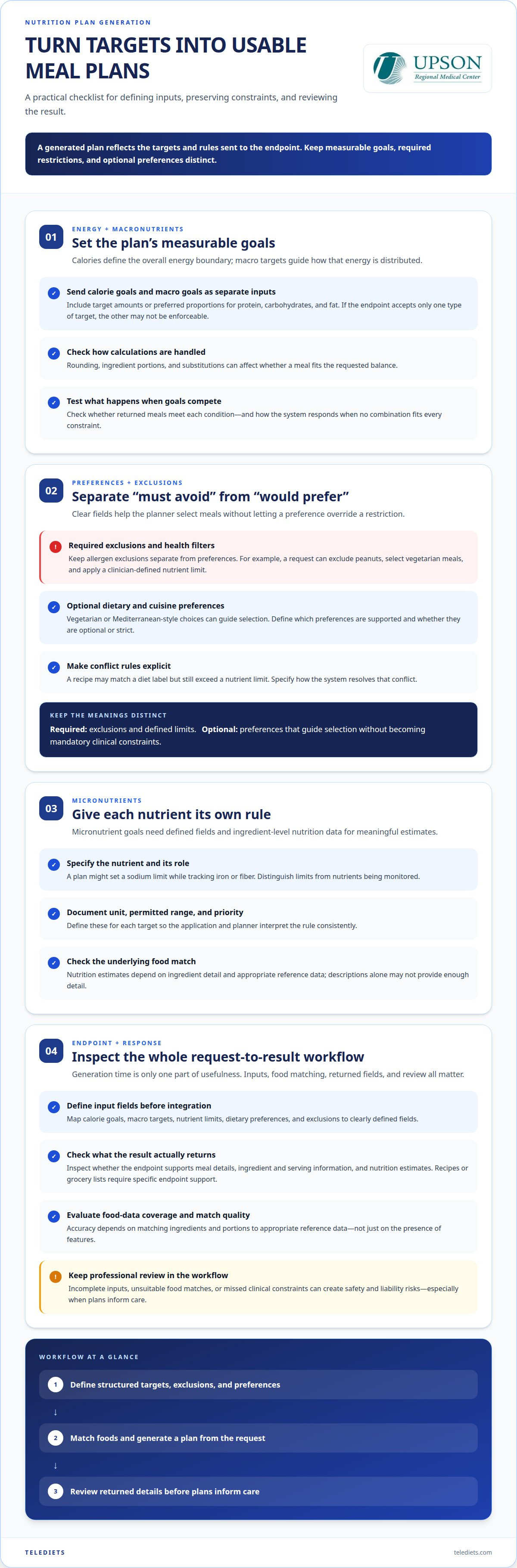
Macro calculations distribute a calorie goal across protein, carbohydrates, and fat. A planner can use the selected proportions to filter recipes, then assess whether candidate meals fit the requested balance. Check how the system handles rounding, ingredient portions, and substitutions, since each can affect the calculation.
Dietary preferences require selection rules, not just labels. A vegetarian preference, for instance, changes which ingredients are eligible, while a lower-carbohydrate preference changes the desired macro balance. Check which preferences are supported and how the system resolves conflicts, such as a recipe matching a diet label but exceeding a nutrient limit.
Micronutrient targets need their own fields and logic. A custom plan might set a sodium limit while tracking iron or fiber. The planner needs ingredient-level nutrition data to estimate these values, since descriptions alone may not provide enough detail. In the application, specify each target’s unit, permitted range, and priority.
Calorie and Macronutrient Goals
Provide calorie and macro goals as separate inputs. A calorie target defines the plan’s overall energy boundary; macro targets guide how that energy is distributed among protein, carbohydrates, and fat. If an API accepts only one type of target, the application may not be able to enforce the other.
For example, developers can submit a calorie goal alongside preferred macro proportions and dietary preferences. Then check whether the returned meals meet each condition and how the system responds when no combination fits every constraint. This matters when fitness-related preferences overlap with clinical limits.
Document each field’s meaning before connecting it to a user interface. A clear target model helps prevent the application from treating a preference as a strict limit. Explore custom meal-planning workflows as you map target inputs to the experience your users need.
Diet-plan endpoint inputs and outputs
A diet-plan endpoint connects application inputs to structured meal-plan results. Define each input and returned value before integrating the endpoint with a database or tracking workflow.
Allergen and Health Filters
Keep allergen exclusions separate from dietary preferences and health filters. A request, for example, can exclude peanuts, select vegetarian meals, and apply a clinician-defined nutrient limit. Cuisine preferences, such as Mediterranean-style meals, can guide selection without overriding those restrictions. Clear fields distinguish required exclusions from optional preferences.
Design the response to show which filters shaped the result. Returned meal details should preserve the ingredient, serving, and nutrition information used by the application. This makes it easier to display relevant details and maintain tracking records. A health-related filter should describe a defined selection criterion, not a diagnosis or treatment decision.
Goal-Based Plan Generation
Goal-based generation uses structured objectives to select suitable meals. Inputs can include a calorie target, macro goals, dietary preferences, and a weight-management objective supplied by the application. Keep these values distinct so that a user preference does not inadvertently become a mandatory clinical constraint.
Specify how the endpoint handles competing goals. A plan, for example, may need to respect an allergen exclusion while meeting a calorie target and cuisine preference. Define which rules take priority, then ensure the response identifies the resulting meals and their nutrition information. This supports review without treating a generated plan as an independent clinical judgment.
For integration, document request fields, accepted formats, and response structure. A database can store submitted goals alongside returned meal plans, while the application presents results for review. Apply consistent validation: reject missing required values, preserve allergen selections, and record changes to preferences or targets. This creates a traceable link between user inputs and generated output instead of an unexplained result.
Nutrition API pricing plans
Compare pricing based on the work each integration performs, not just its headline tier. A nutrition-data endpoint that returns food details serves a different purpose from personalized plan generation based on dietary constraints. Forecast usage separately for food-data searches, plan requests, and any supporting endpoints.
Pricing may be based on request volume, access tier, or a negotiated arrangement. Each model affects what drives the total, including request frequency, included endpoints, data coverage, and customization. A protein lookup and a multi-meal plan request may use different resources, so map expected use cases before estimating demand.
For a tailored API arrangement, pricing depends on the use case and is provided after a quote request. Relevant factors include expected request volume, endpoint selection, required nutrition data, and integration scope. This is more useful than comparing a generic million-request forecast with a plan that includes different functions.
Build a cost review around practical scenarios:
- Estimate routine food searches separately from generated meal plans.
- Identify which endpoints return ingredients, nutrient values, or complete plans.
- Account for testing and production activity in the forecast.
- Assess whether the pricing model remains workable as personalized use grows.
Compare each plan’s limits with your application’s workflow. If clinicians need both ingredient-level nutrition data and generated plans, for example, establish how each function is counted. A low base tier may not fit if essential endpoints require a higher tier, while a broad plan may exceed actual needs. Compare options using the same request pattern and required functions.
For clinical meal-plan workflows, explore TeleDIETS meal-plan options that align with your practice needs.
TeleDIETS: GLP-1 Meal Plan Protocols
TeleDIETS offers GLP-1 Meal Plan Protocols for healthcare professionals seeking structured nutrition support within clinical workflows. Its medical nutrition therapy platform also includes Standard Series Meal Plans and Advanced Medical Series Meal Plans, with plans tailored to lab results and clinical diagnoses.
Consider these offerings when your practice needs more than endpoint-level meal generation, particularly for chronic disease management or workflows involving GLP-1 nutrition protocols. Insurance Billing & CPT Coding Tools can also support related practice processes. Generated plans are tools for professional use, not a replacement for clinical judgment.
Contact TeleDIETS to discuss how its meal-plan offerings may fit your workflow.
Build the Next Step Into Your Workflow
Choose an integration based on how your team will use generated plans, not speed alone. An API for nutrition plan generation is most useful when its inputs, outputs, and review process fit your clinical workflow. Define which decisions your application should support, then identify the nutrition tools that belong alongside it.
For a structured clinical nutrition approach, TeleDIETS offers Standard Series Meal Plans, Advanced Medical Series Meal Plans, and GLP-1 Meal Plan Protocols. These options give healthcare professionals a way to align meal-planning resources with different practice needs. Your next step is to clarify which workflow you want to support and how generated plans will be incorporated into professional review.
Contact TeleDIETS about nutrition APIs to discuss the approach that fits your workflow. A clear plan for integration can help your team move forward with confidence.
Frequently Asked Questions
Is there a free tier or sandbox?
Free access and sandbox environments depend on the API provider’s terms. When available, a sandbox can help you test request formatting and application behavior outside live workflows. Before selecting a service, establish whether test requests count toward usage, which functions are available, and whether credentials differ between test and production environments.
What APIs generate personalized nutrition plans?
Look for a solution that generates plans, rather than one that only returns food or nutrient data. An API for nutrition plan generation should match its intended setting and required inputs. TeleDIETS provides an AI engine or SaaS application for healthcare professionals, with plans tailored to lab results and clinical diagnoses.
What nutrition data and user inputs do these APIs require?
Required fields depend on the API’s function and the plan being created. Clinical workflows may use lab results and diagnoses; TeleDIETS’ AI diagnostic integration can read CMP biomarker lab results and ICD-10 codes to automatically recommend appropriate meal plans. Confirm how the API represents each field, handles missing values, and returns results your application can use.
Which nutrition APIs support dietary preferences, allergies, and medical restrictions?
Support varies by product, so distinguish documented filters from general plan-personalization claims. Review whether the API accepts preferences, allergy exclusions, and medical constraints as separate inputs, and whether its response identifies how they were applied. For clinical nutrition workflows, TeleDIETS offers Standard Series Meal Plans and Advanced Medical Series Meal Plans.
What are the pricing plans and usage limits for nutrition APIs?
Providers set their own pricing models and usage limits, so compare billing methods and included functions rather than assuming a standard structure. Review request caps, endpoint access, test usage, and what happens when an account reaches its limit. To learn about TeleDIETS pricing, request a quote rather than assuming a price.
How do I integrate a nutrition plan API into an app?
Start by mapping the user flow, then connect your application using the provider’s documented authentication and request format. Test representative inputs, validate returned fields, and handle errors before production use. Keep clinical review in the workflow when plans support care, and define how your application stores and displays results.
Leave a Reply