
A reusable spreadsheet can work better than a static template. If you need a replacement for existing spreadsheet templates for dietitians, you can build one in Excel or Google Sheets and adapt its fields, formulas, and layout to your workflow. The goal is a dependable, customizable starting point, not a one-size-fits-all tool.
A practical structure can make recurring work easier while preserving flexibility for nutrition planning and tracking. This article explains how to create reusable templates, tailor them to different tasks, and use them in your workflow.
You’ll find examples of spreadsheet tools for meal planning, nutrition tracking, and client management, plus guidance on what to include and where a spreadsheet may be less suitable. Use these steps to turn a blank workbook into a resource for consistent, organized work.
Key Takeaways
- Build reusable Excel or Google Sheets templates by organizing fields, formulas, and layouts around a specific workflow.
- Choose tools for meal planning, nutrition tracking, or client management based on the task they need to support.
- Assess whether a free spreadsheet or software option fits your workflow before relying on it for recurring work.
- Explore TeleDIETS meal plans and insurance billing and CPT coding tools when you need support beyond a spreadsheet.
Creating reusable templates in Excel or Google Sheets
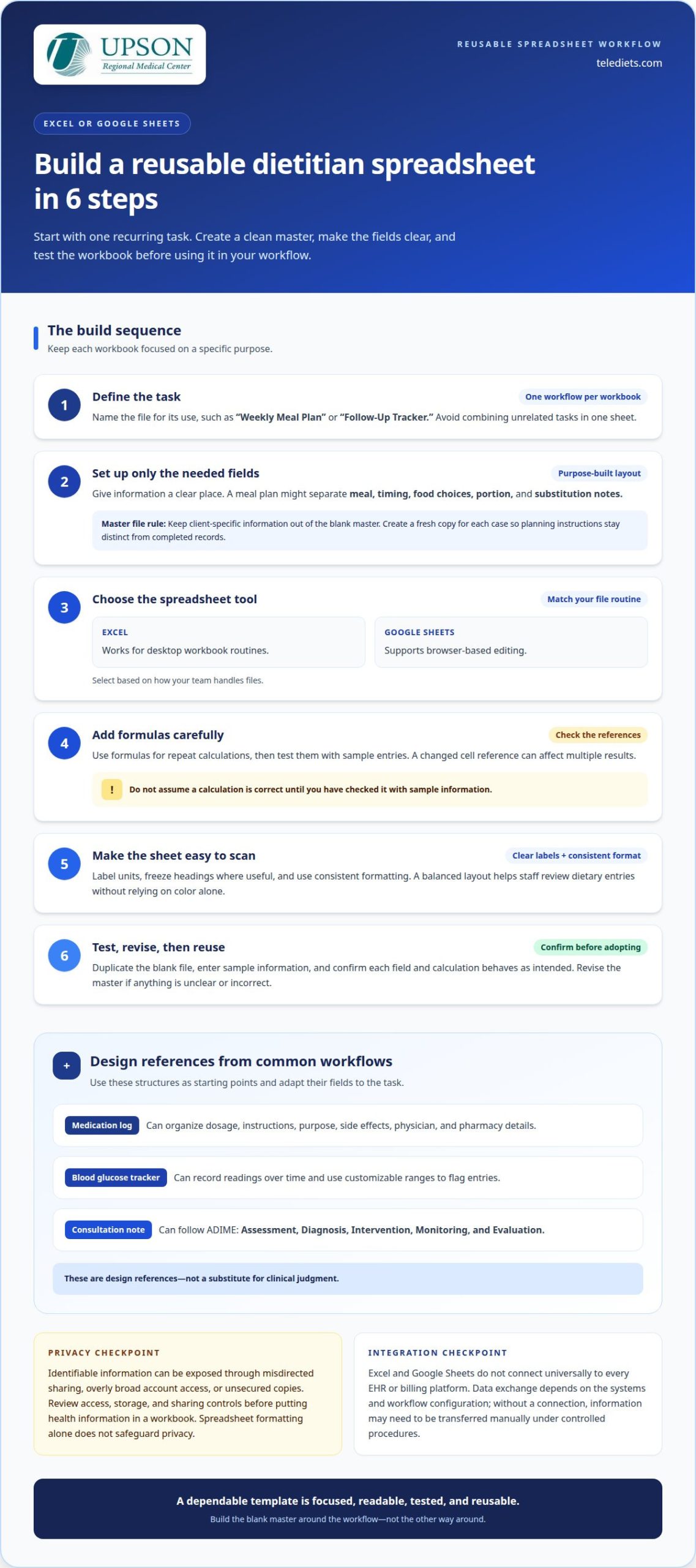
Start with a recurring task, such as drafting a meal plan or recording follow-up measurements. Excel and Google Sheets let you organize information in rows and columns and reuse a clean copy for each workflow. Make dietary details easy to review without making every client’s plan identical.
Build the workbook around a specific purpose. For a meal plan, give meals, timing, food choices, and notes their own clear fields. Keep client-specific information out of the blank master and create a fresh copy for each case. This makes updates easier and helps distinguish planning instructions from completed records.
- Define the task. Name the workbook for its use, such as “Weekly Meal Plan” or “Follow-Up Tracker.” Avoid combining unrelated tasks in one sheet.
- Set up the fields. Add only information needed for that task. A meal plan might include meal, food, portion, and substitution notes.
- Choose Excel or Google Sheets. Excel works for desktop workbook routines; Google Sheets supports browser-based editing. Select based on how your team handles files.
- Add formulas carefully. Use formulas for repeat calculations, then test them with sample entries. A changed cell reference can affect multiple results.
- Make it readable. Label units, freeze headings where useful, and use consistent formatting. A balanced layout helps staff scan dietary entries without relying on color alone.
- Test and revise. Duplicate the blank file, enter sample information, and confirm each field and calculation behaves as intended before adopting it.
Use Excel examples as design references. A medication log can organize dosage, instructions, purpose, side effects, physician, and pharmacy details. A blood glucose tracker can record readings over time and use customizable ranges to flag entries. A consultation note can follow ADIME: Assessment, Diagnosis, Intervention, Monitoring, and Evaluation. Adapt these structures to your workflow, rather than treating them as a substitute for clinical judgment.
Which spreadsheet or nutrition tools integrate with electronic health records and billing software? Excel and Google Sheets don’t connect universally to every EHR or billing platform. Data exchange depends on the systems and workflow configuration. Without a connection, information may need to be transferred manually under controlled procedures.
What privacy and HIPAA risks come with storing client health information in spreadsheets? Identifiable information can be exposed through misdirected sharing, overly broad account access, or unsecured copies. Review access, storage, and sharing controls before putting health information in a workbook. Spreadsheet formatting alone does not safeguard privacy.
An Indian food macro reference sheet covers 100+ standard Indian staples, offering a starting point for meal-plan fields. Keep it separate from client records and verify entries before using them in individual plans.
What spreadsheet templates do dietitians use for meal planning, nutrition tracking, and client management?
Dietitians can use separate templates for planning, tracking, and client records. A 7-Day Meal Plan Template organizes a week of meals, while a food log captures dietary intake. A consultation note or follow-up checklist supports organized client management. Choosing by task keeps each workbook focused and easier to maintain.
Meal planning: A dietitian meal plan template can arrange meals by timing, show macro breakdowns, and include food swap tables. These fields help present a plan in a consistent format while leaving room for individual adjustments. A 7-day plan can also be adapted for Indian vegetarian, eggetarian, and non-vegetarian diets.
Nutrition tracking: Different logs answer different questions. Choose a template that matches the information you need to track:
- Daily food calorie and fat log: Records foods, calories, and fat grams, then calculates fat as a percentage of the logged diet.
- Diet and exercise journal: Tracks food consumption, calories, carbohydrates, sugars, and fiber alongside workout duration and calories burned.
- Recipe nutrition calculator: Uses recipe ingredients to calculate calories, fats, proteins, carbohydrates, and other nutritional data.
- Calorie amortization schedule: Uses age, height, weight, gender, activity level, and goal weight to calculate daily calorie intake.
Each tracker has a defined purpose. A food log summarizes recorded intake, while a recipe calculator analyzes ingredients. Results depend on the information entered, so make each template’s fields and units clear.
Client management: An intake form can organize health history, medical conditions, medication checks, dietary recall, and food allergies. A dietitian follow-up checklist covers 15 review points for weekly and monthly check-ins. Together, these formats help structure information before and during follow-up, without treating a spreadsheet as a substitute for clinical assessment.
For documentation, a consultation note template can include PES statements and follow the ADIME sequence: Assessment, Diagnosis, Intervention, Monitoring, and Evaluation. This provides a recognizable structure while letting practitioners tailor fields to their documentation workflow. Keep intake, progress tracking, meal plans, and notes in separate files or clearly labeled tabs so each record has a distinct purpose.
To select a practical set, start with the task that needs structure. A meal plan benefits from timing and swap fields; a follow-up tracker benefits from review prompts. If your workflow needs prepared medical nutrition plans alongside tracking, clinical meal planning support may be a more suitable next step than adding another spreadsheet.
Nutrition professionals can create reusable meal plan templates in Excel or Google Sheets and tailor them for each client. For those starting out, creating a plan may take several hours, so a reusable structure can make the work more manageable while leaving room for individual needs. People should check with a doctor before planning changes to their diet or exercise. A spreadsheet can organize choices and records, but it does not replace advice from a health professional or individualized clinical judgment.
Are there free spreadsheet templates or free dietitian software alternatives?
Free options can help you test a workflow before adopting dedicated clinical software. Excel and Google Sheets let you build your own template, while a downloadable workbook may provide a starting structure. Remember that a free template does not mean the application itself is free, so consider both the file and the tool required to use it.
Start with a recurring task and compare how each option handles it. For example, build a planning grid in Google Sheets or use Excel to organize recurring tracking fields. Note which steps remain manual and where the layout needs adjustment. This makes choosing a spreadsheet templates for dietitians replacement about workflow fit, not just feature lists.
- Self-built Excel workbook: Useful for a focused task with fixed fields and calculations. Test formulas with sample entries before using the workbook in practice.
- Google Sheets template: Useful when browser-based editing suits your workflow. Separate the blank master from working copies, and manage access to each file.
- Downloadable spreadsheet: Useful as a layout reference when it matches your task. Review its fields, formulas, and intended use before adapting it.
- Clinical nutrition software: Consider it when repeated entry, documentation, or billing-related work becomes difficult to manage across separate files. Compare the workflow you need with the tasks the software supports.
“Free” does not account for all the work involved. A template may need setup, formula testing, revisions, and careful file handling. Software can reduce some manual work, but its value depends on how well it supports your practice’s tasks. List the steps in a recurring workflow, then mark which are automated, manual, or missing in each option.
Compare a spreadsheet process with a workflow that handles meal planning and billing-related administration separately. If a task requires repeated entry across files, identify where information is copied and where errors might occur. If a template supports the task without adding steps, continuing to use a spreadsheet may make sense.
Before choosing, assess a template’s accuracy, editability, and upkeep. Check that formulas respond correctly when entries change, and remove fields that do not serve the workflow. For client information, restrict access to people who need it and avoid unnecessary copies. A useful spreadsheet templates for dietitians replacement decision starts with the work the tool must support, not the promise of a free file.
If your practice is moving beyond manual spreadsheets, explore clinical nutrition workflow tools as a next step.
TeleDIETS
When spreadsheets no longer fit a nutrition workflow, TeleDIETS offers healthcare professionals a clinical alternative. Its medical nutrition therapy platform supports evidence-based plans tailored to lab results and clinical diagnoses, helping practices move beyond manually assembled files.
Standard Series Meal Plans and Advanced Medical Series Meal Plans support different levels of nutrition care, while GLP-1 Meal Plan Protocols address a specialized clinical workflow. Insurance Billing & CPT Coding Tools can also support administrative tasks related to billing. Together, these offerings provide options for practices seeking structured tools alongside or instead of spreadsheet-based processes.
If recurring manual work makes meal planning or related administration harder to manage, consider whether a clinical tool fits your workflow. Contact TeleDIETS to discuss your practice’s needs.
Choose a Practical Next Step
You do not need to replace every spreadsheet at once. Identify where manual work causes the most friction, such as repeated entry, record review, or maintaining consistency across a workflow. Use that priority to decide whether to refine a workbook or move a specific task to a clinical tool.
Choose replacement spreadsheet templates for dietitians based on fit, not novelty. Map the information your team uses, the decisions it supports, and the handoffs that follow. Then consider whether a clinical platform could support the process. A focused transition can preserve familiar steps while improving the parts of the workflow that spreadsheets no longer serve well.
Start with one priority and define what a more workable process would look like for your practice. Start a conversation with TeleDIETS about your workflow. A thoughtful next step can help you build a system that supports your team’s clinical work with greater clarity.
Frequently Asked Questions
What are the best replacements for dietitian spreadsheet templates?
The best replacement is a clinical nutrition tool suited to work your spreadsheets cannot support efficiently. Practices seeking plans tailored to lab results and clinical diagnoses can consider TeleDIETS, a medical nutrition therapy platform offered as SaaS or an AI engine. Options include Standard Series Meal Plans and Advanced Medical Series Meal Plans. Choose based on the clinical tasks your practice needs to support.
What should dietitians consider when choosing a replacement for spreadsheet templates?
Map the workflow from the information entered to the resource or action produced. Note whether a tool needs to support plans tailored to lab results and diagnoses, or whether a reusable planning sheet is sufficient. Test the proposed process with sample entries, review how staff will use the outputs, and identify spreadsheet steps that can be retired. This keeps the transition focused on practical fit.
Leave a Reply